Installation
Strata installs like any other FreeCAD add-on. It takes about two minutes.
Requirements
FreeCAD |
Version 1.0 or newer. Developed and tested on FreeCAD 1.1.4 on Windows 11. |
Git |
Any recent version. Strata uses Git to store history; you never use it yourself. |
Operating system |
Windows is fully tested. On Linux the engine’s test suite passes on every change; the FreeCAD interface has not been tested there yet. macOS has not been tested. Reports are welcome. |
Installing Git
- Windows
-
Download and run the installer from git-scm.com. The default options are fine. Strata also finds the Git that comes with GitHub Desktop.
- Linux
-
Install the
gitpackage, for examplesudo apt install giton Debian or Ubuntu,sudo dnf install giton Fedora. - macOS
-
Run
xcode-select --install, or install Git with Homebrew:brew install git.
Strata looks for Git on the PATH and, on Windows, in the default Git for Windows and GitHub Desktop locations.
If it cannot find Git, it tells you when you first turn on version control.
|
Option A: the Addon Manager (recommended)
Strata is not yet in FreeCAD’s official add-on list, so you add its repository once:
-
In FreeCAD open .
-
Under Custom repositories click + and enter
Repository URL
Branch
main -
Click OK and open .
-
Type
stratain the search box. The entry is called freecad-strata, after its repository. -
Select it, click Install and restart FreeCAD when asked.
The Addon Manager installs Strata into a folder named freecad-strata inside FreeCAD’s Mod folder, and offers updates when new versions are published.
Option B: install by hand
Copy or clone the repository into FreeCAD’s user Mod folder, as a folder named Strata:
| FreeCAD | Windows | Linux | macOS |
|---|---|---|---|
1.1 |
|
|
|
1.0 |
|
|
|
For example, with Git:
git clone https://github.com/Foadsf/freecad-strata.git "$env:APPDATA\FreeCAD\v1-1\Mod\Strata"git clone https://github.com/Foadsf/freecad-strata.git ~/.local/share/FreeCAD/v1-1/Mod/StrataRestart FreeCAD afterwards.
| Use either the Addon Manager or a manual install, not both. Two copies would load Strata twice. |
Check the installation
After restarting FreeCAD you should see:
-
the Versions and history panel on the right (press Ctrl+Shift+H if it is hidden),
-
five new entries at the bottom of the Tools menu, with their keyboard shortcuts,
-
a Strata toolbar, and a Strata entry in the workbench selector.
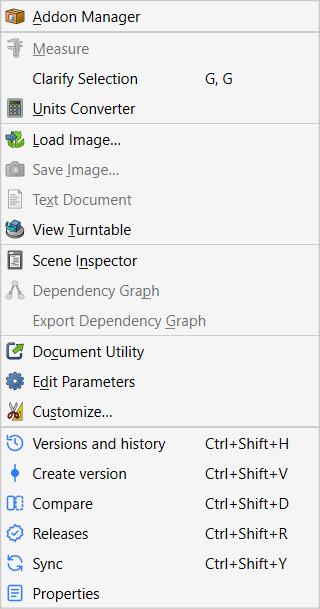
If none of these appear, open and look for a line starting with Strata failed to start.
See Strata does not appear for help.
Update
- Addon Manager
-
shows an update for freecad-strata when one is available. Click Update and restart FreeCAD.
- Manual install
-
run
git pullin theStratafolder, or replace its contents with the new release, then restart FreeCAD.
Updating Strata never touches your projects or their history.
Uninstall
- Addon Manager
-
select freecad-strata and click Uninstall, then restart FreeCAD.
- Manual install
-
close FreeCAD and delete the
Stratafolder fromMod.
Your projects keep their history in their own .strata folders. Re-installing Strata later picks it up again.
|
On Windows, FreeCAD 1.1.4’s Addon Manager may report Failed to remove some files.
The add-on’s files are removed, but an empty |