The classic first parametric exercise: a grid of circles whose size depends on the distance to an "attractor" point, extruded into tubes. You will build a grid with Graft, measure distances, and remap them into radii.
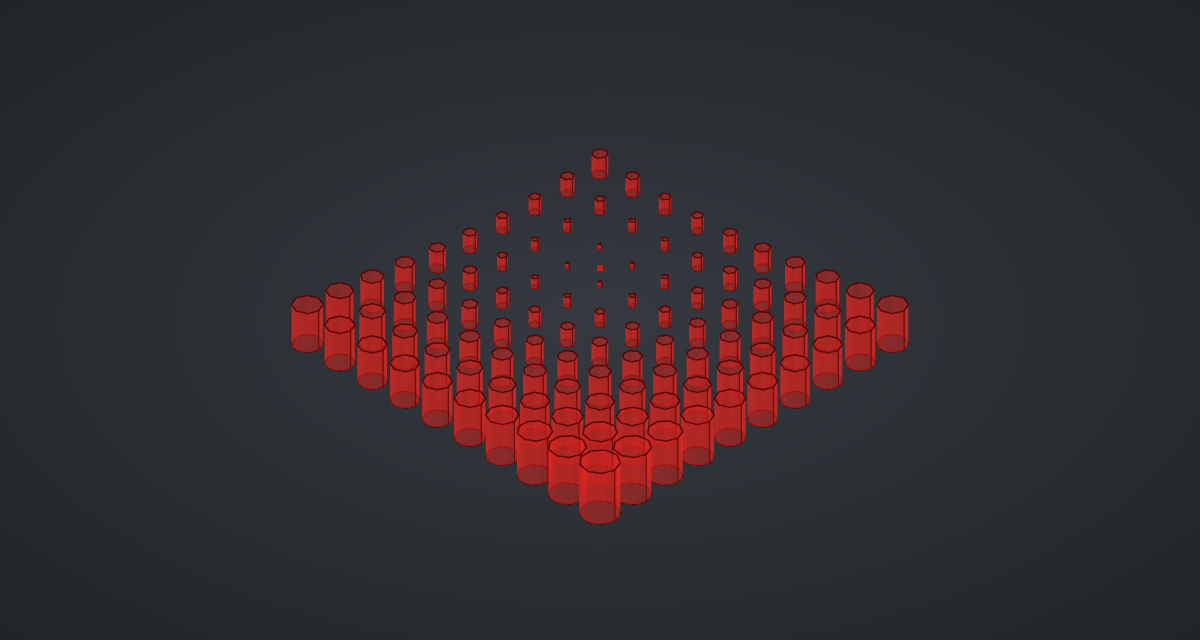
Reference: choose on the canvas toolbar to load the finished definition.
Build it
The grid
-
Place two sliders: Count: 10 (2 – 20) with Decimals
0, and Spacing: 10 (2 – 30). -
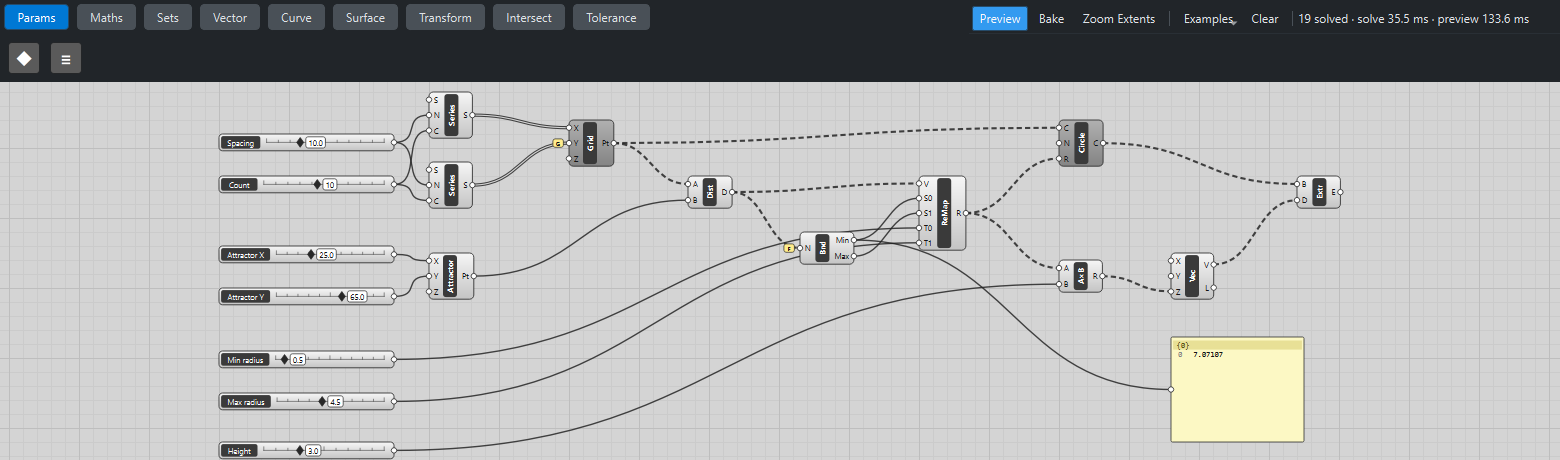
Place two Series (Sets). Wire Spacing → N and Count → C on both.
-
Place a Construct Point (Vector). Wire the first Series → X and the second Series → Y.
You get only 10 points, on a diagonal: X and Y were paired item by item.
-
Right-click Construct Point’s Y grip and tick Graft. Now every Y value sits in its own branch, the single X branch is reused for each, and you get the full 10 × 10 grid, one branch per row. (See two classic patterns.)
Distance to the attractor
-
Place two sliders, Attractor X: 25 (-20 – 120) and Attractor Y: 65 (-20 – 120), and a second Construct Point. Wire them into its X and Y.
-
Place a Distance (Vector). Wire the grid Pt → A and the attractor Pt → B. You now have 100 distances, in the same 10 branches as the grid.
Distances to radii
-
Place a Bounds (Maths) and wire Distance D → N. Right-click its N grip and tick Flatten: you want the smallest and largest distance of the whole grid, not of each row.
-
Place two sliders, Min radius: 0.5 (0.1 – 5) and Max radius: 4.5 (0.5 – 10).
-
Place a Remap Numbers (Maths). Wire Distance D → V, Bounds Min → S0, Bounds Max → S1, Min radius → T0 and Max radius → T1. The nearest point now gets 0.5, the farthest 4.5, everything else in between.
Circles and tubes
-
Place a Circle CNR (Curve). Wire the grid Pt → C and Remap R → R. Its normal N defaults to Z, so the circles lie flat.
-
Place a slider Height: 3 (0 – 10), a Multiplication (Maths), a Vector XYZ (Vector) and an Extrude (Surface). Wire Remap R → A, Height → B, Multiplication R → Vector Z, Circle C → Extrude B and Vector V → Extrude D.
-
Turn Preview off on the grid Construct Point and on Circle CNR so only the tubes are drawn.
What is happening
Every component after Construct Point works on 10 branches of 10 items, and every one of them keeps that structure, so each radius, circle and tube stays matched to its own grid point. Bounds is the exception: with Flatten it sees all 100 distances at once and returns one minimum and one maximum, which Remap then reuses for every branch (a one-branch input is repeated).
Things to try
-
Drag Attractor X and Attractor Y: the small tubes follow the attractor.
-
Swap Min radius and Max radius (set Min to 4.5 and Max to 0.5): the effect inverts.
-
Raise Count to 20 for 400 tubes. Each update then takes noticeably longer, mostly to mesh the preview: with 100 tubes expect roughly 25 ms to solve and 125 ms to draw.
-
Drag Height to 0. Extrude turns red ("Direction must not be zero"): a zero-length vector cannot make a surface.
-
Select Extrude and click Bake to add the 100 tubes to your document.