Data in Katydid flows as trees: ordered branches of items, each branch addressed by a path. Understanding trees is the key to making one definition handle many objects at once.
Items, lists and trees
A path is a short list of whole numbers written in braces: {0}, {0;2}, {1;0;3}. A branch is the list of items stored under one path. A tree is a set of branches, always kept in path order.
| Shape of data | Example | Wire style |
|---|---|---|
One item |
|
thin solid |
A list |
|
double line |
A tree |
|
dashed |
Nothing |
no items at all |
thin dashed orange |
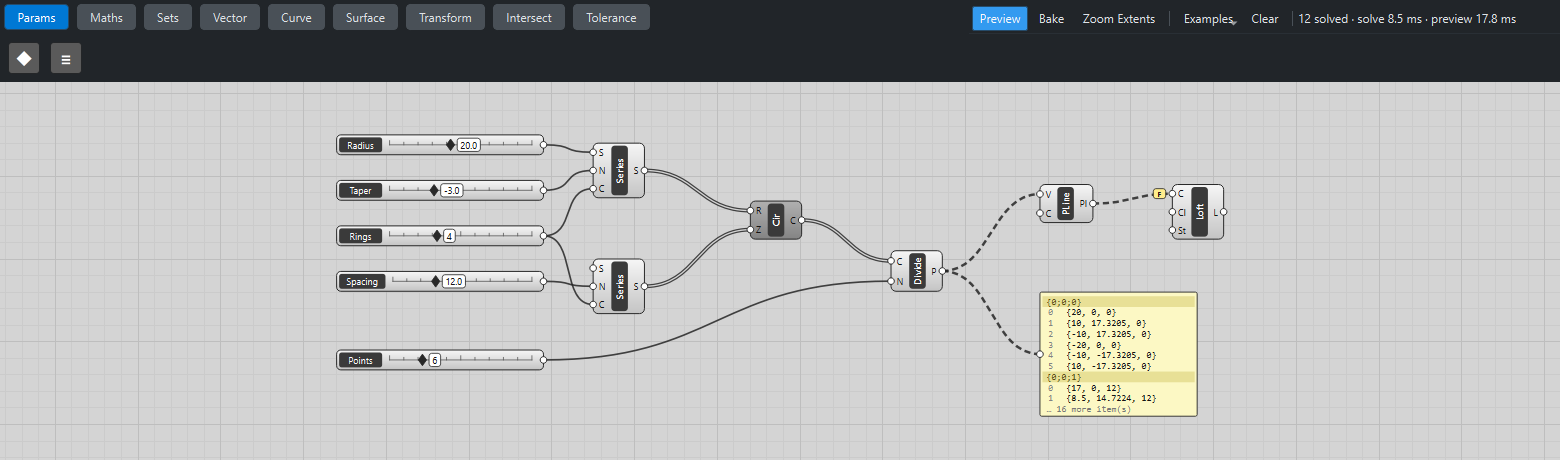
A Panel shows a tree branch by branch: a shaded header line with the path, then the items with their index in grey.
Access: item, list or tree
Every input has an access mode that decides how much data the component sees in one go. You can read it in the grip’s tooltip and in the component reference.
| Access | The component receives… |
|---|---|
item |
one item at a time, and runs once per item |
list |
a whole branch as one list, and runs once per branch |
tree |
the whole tree, and runs once |
For example, Center Box has item access: give it 4 sizes and you get 4 boxes. Polyline has list access on its points: give it a branch of 6 points and you get one polyline through them. Panel has tree access: it shows everything at once.
How inputs are matched
When a component has several inputs, Katydid has to decide which data goes with which. It does this in two steps.
Branch by branch. The inputs are lined up branch by branch: first branch with first branch, second with second, and so on. If one input has fewer branches than another, its last branch is repeated. The output branches take their paths from the first input that has the most branches.
Item by item. Inside a pair of branches, item inputs are lined up item by item. If one list is shorter, its last item is repeated ("longest list"). An input with a default value and no wire behaves like a one-item list.
| Input A (item) | Input B (item) | Pairs computed |
|---|---|---|
|
|
|
|
|
|
|
|
|
The last row shows both rules: B’s single branch is reused for each of A’s three branches, and the paths come from A because it has the most branches.
Where outputs go
An item output collects one value per run into the branch it was computed in.
A list output (for example Divide Curve's points, or Series) produces a whole list per run, so each run gets its own branch: the input’s path with the run’s index added. Dividing three circles that sit in {0} gives {0;0}, {0;1} and {0;2}, one branch of points per circle. This is how trees grow, and it is what you usually want: the points of each circle stay together.
Flatten, Graft, Simplify, Reverse
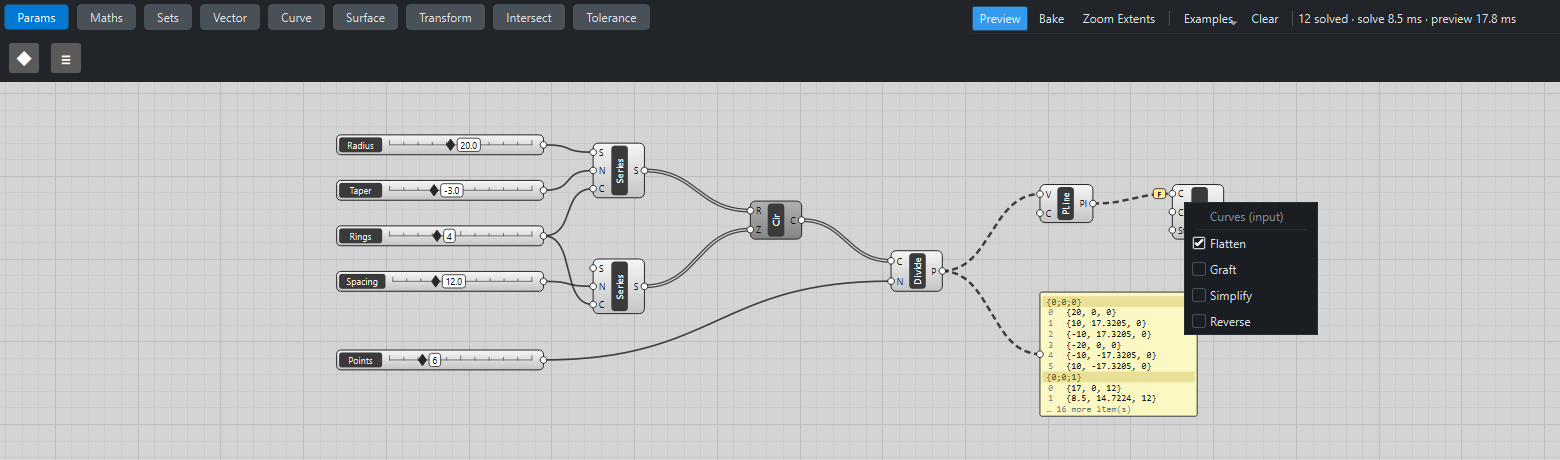
Right-click any grip to change how its data is mapped. On an input the mapping applies to the data arriving; on an output it applies to the data leaving. A yellow badge next to the grip shows the setting.
| Mapping | Badge | What it does | Example |
|---|---|---|---|
Flatten |
F |
Puts every item into the single branch |
|
Graft |
G |
Gives every item its own branch, adding its index to the path. |
|
Simplify |
S |
Drops empty branches and the leading path indices that every branch shares (keeping at least one). |
|
Reverse |
R |
Reverses the order of items inside each branch. Combines with the others. |
|
Flatten, Graft and Simplify are mutually exclusive on one grip; Reverse can be added to any of them.
Two classic patterns
Every X with every Y (a grid). Two Series give lists of X and Y values in single branches. Wired straight into Construct Point they pair up item by item: you get points along a diagonal. Graft the Y input instead: Y now has one branch per value, its single X branch is repeated for each, and you get a full grid, one branch per row. The attractor tutorial is built this way.
One result from many branches. A component with list access, like Loft, runs once per branch. If each ring’s polyline sits in its own branch, Loft receives one curve at a time and fails ("a loft needs at least two section curves"). Flatten its input and Loft receives all rings in one list. The tree tutorial shows exactly this.
A note on Grasshopper
These rules are written to behave like Grasshopper’s, and they are spelled out in katydid/engine.py and checked by the test suite. They have not been verified against Grasshopper itself. If you find a case where Katydid and Grasshopper disagree, please open an issue with both results.