Make one box, then a row of copies whose number and spacing come from sliders. You will meet lists, the Series component and longest-list matching.

Reference: choose on the canvas toolbar to load the finished definition.
Build it
-
Place four Number Slider (Params) components and set them up:
-
Width: 20 (5 – 40)
-
Height: 30 (0 – 80)
-
Spacing: 32 (10 – 60)
-
Count: 4 (1 – 8), with Decimals set to
0
-
-
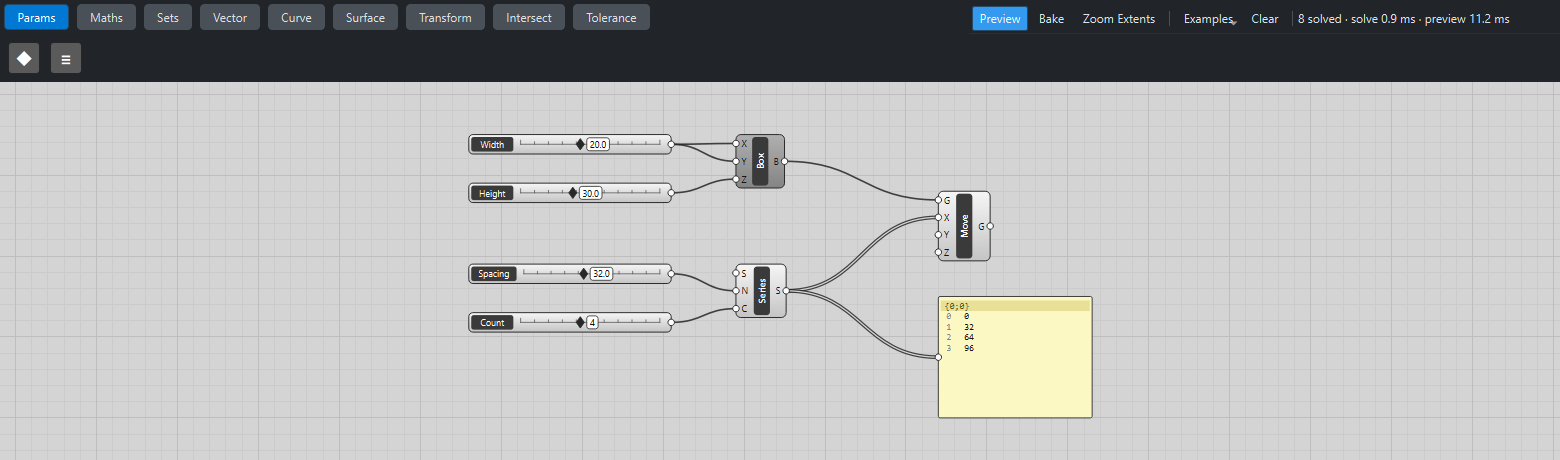
Place a Center Box (Surface). Wire Width → X and Width → Y, and Height → Z.
-
Place a Series (Sets). Wire Spacing → N (the step) and Count → C (how many). Leave S (the start) at its default of 0.
-
Place a Move (Transform). Wire Box B → G and Series S → X.
-
Place a Panel (Params) and wire Series S → Panel.
-
Right-click the Center Box and untick Preview, so only the moved copies are drawn.
What is happening
Series makes a list: 0, 32, 64, 96. The Panel shows it under the path {0;0}, and the wire leaving Series is drawn as a double line because it carries a list.
Move has item access on both inputs. Its geometry input gets one box; its X input gets four numbers. Katydid lines the items up and repeats the last item of the shorter list (longest list), so Move runs four times with the same box and four different offsets: four boxes.
Things to try
-
Drag Count and Spacing. When Spacing is smaller than Width the boxes overlap.
-
Drag Height to 0. The Box turns red (a box needs a positive size) and Move turns orange, because it no longer receives geometry. Hover over each to read the message.
-
Right-click Series' S grip, choose Set value… and enter
5: the whole row shifts by 5 mm in X. -
Select Move and click Bake. Four boxes are added to your FreeCAD document; Ctrl+Z removes them again.
-
Add a Solid Union (Intersect) after Move. Drag Spacing below Width so the boxes overlap, and they fuse into a single solid; with gaps between them the result stays four separate solids.