Stack a few circles, divide each into points, join each set of points into a polygonal ring, and loft one surface through all the rings. Along the way the data grows into a tree, and you will see why Loft needs Flatten.

Reference: choose on the canvas toolbar to load the finished definition.
Build it
-
Place five Number Slider components:
-
Rings: 4 (2 – 8), Decimals
0 -
Radius: 20 (5 – 40)
-
Taper: -3 (-8 – 8)
-
Spacing: 12 (4 – 30)
-
Points: 6 (3 – 16), Decimals
0
-
-
Place a Series (Sets) for the radii. Wire Radius → S, Taper → N and Rings → C. It produces 20, 17, 14, 11.
-
Place a second Series for the heights. Wire Spacing → N and Rings → C. It produces 0, 12, 24, 36.
-
Place a Circle (Curve). Wire radii Series → R and heights Series → Z. You now have four stacked circles. Turn the Circle’s Preview off.
-
Place a Divide Curve (Curve). Wire Circle C → C and Points → N.
-
Place a Panel and wire Divide Curve P → Panel.
-
Place a Polyline (Curve). Wire Divide Curve P → V, then use Set value… on its C (Closed) input to set it to
True. -
Place a Loft (Surface) and wire Polyline Pl → C.
At this point Loft is red. Hover over it: "A loft needs at least two section curves".
-
Right-click Loft’s C grip and tick Flatten. A yellow F badge appears next to the grip and the loft appears in the 3D view.
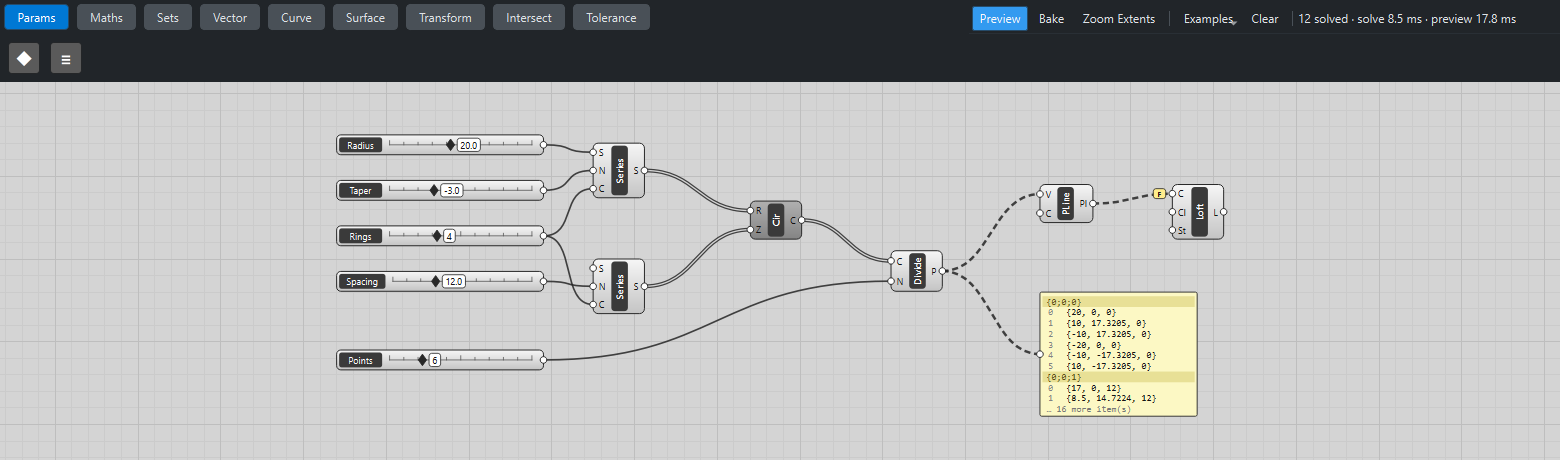
What is happening
Follow the paths in the Panel:
| Step | Data | Why |
|---|---|---|
Series |
|
A list output: one list, in one branch. |
Circle |
|
Item access: four runs, collected in the same branch. |
Divide Curve |
|
A list output: each run (each circle) gets its own branch. |
Polyline |
|
List access: one run per branch, one ring per branch. |
Loft, without Flatten |
error |
List access: one run per branch, and each branch holds a single ring. |
Loft, with Flatten |
|
Flatten puts all four rings into one list first. |
The wires from Divide Curve onwards are dashed because they carry a tree with several branches.
Things to try
-
Drag Points to 3 (triangles) or 16 (nearly round), and Taper to a positive value to flare the shape outwards.
-
Right-click Divide Curve’s P output grip and tick Simplify. The paths in the Panel become
{0}…{3}; nothing else changes. -
Add a Cap Holes (Surface) after Loft to close the top and bottom: the open surface becomes a solid you can bake.
-
Untick Flatten again and add a Graft to Divide Curve’s output instead: now every single point gets its own branch, and Polyline fails for the same reason Loft did.