Tutorial AQ: Hexagonal Screw
| Source |
Ming C. Leu, Wenjin Tao, Amir Ghazanfari and Krishna Kolan, NX 12 for Engineering Design (Missouri University of Science and Technology), section 4.7.1 (Hexagonal Screw). |
| You learn |
Cylinder at the centre of a face, Polygon, Extrude as a body of its own, Static Wireframe for picking hidden edges, Sphere with Intersect and Select Body, Thread (Detailed) |
| Sizes |
the book’s, in inches, typed in millimetres. Shank Ø0.25 × 1.5, step Ø0.387 × 0.0156, hexagon side 0.246 extruded 0.1876, a cylinder Ø0.387 × 0.1875 inside the head, a Sphere Ø0.55. The thread is NX’s default for the shank, 1/4-20 UNC. |
Step by step
1. The shank and the step
Ctrl+N and save the part as Impeller_hexa-bolt.
Click Cylinder, choose ZC, keep the point at (0, 0, 0), and type Diameter 0.25 and Height 1.5 (6.35 and 38.1 mm).
Click OK.
Click Cylinder again and type Diameter 0.387 and Height 0.0156 (9.8298 and 0.39624 mm). In Specify Point choose Arc/Ellipse/Sphere Center and click the shank’s top face: the point is its centre. Choose Unite and click OK.
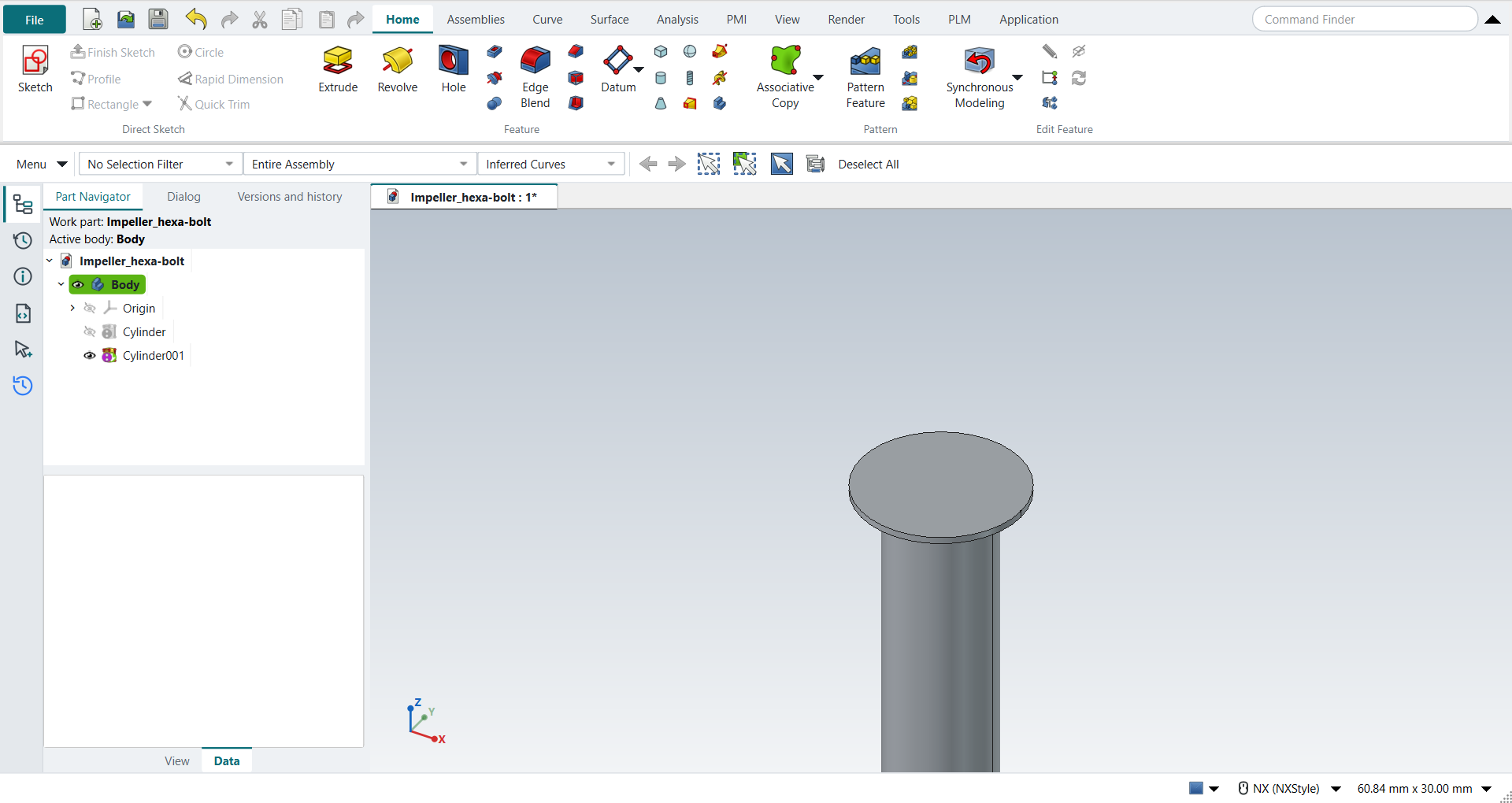
2. The hexagon head
Select the step’s top face and click Sketch: the sketch’s origin is the circle’s centre. Press P for Polygon. FreeCAD asks for the number of sides: type 6 and click OK. Type the centre (0, 0) in the fields beside the pointer, then the corner: length 6.2484 mm (0.246 in) at angle 0. A regular hexagon’s circumradius equals its side length, so this is NX’s Side Length 0.246 with Rotation 0. Press MB2, then Ctrl+Q.
Click Extrude, click a side of the hexagon, keep Boolean None and type 4.76504 mm (0.1876 in). Click OK. The head is a body of its own, which the Intersect below needs.
3. The rounded head
Switch to Static Wireframe (View tab): the next two picks are edges inside the head. Click Cylinder, type Diameter 0.387 and Height 0.1875, and with Arc/Ellipse/Sphere Center click the step’s top edge. Keep Boolean None, and click OK.
Click Sphere (Center Point and Diameter). With Arc/Ellipse/Sphere Center click the bottom edge of that cylinder, and type Diameter 0.55 (13.97 mm). Choose Intersect, choose the hexagonal head in Select Body, and click OK. Switch back to Shaded with Edges.
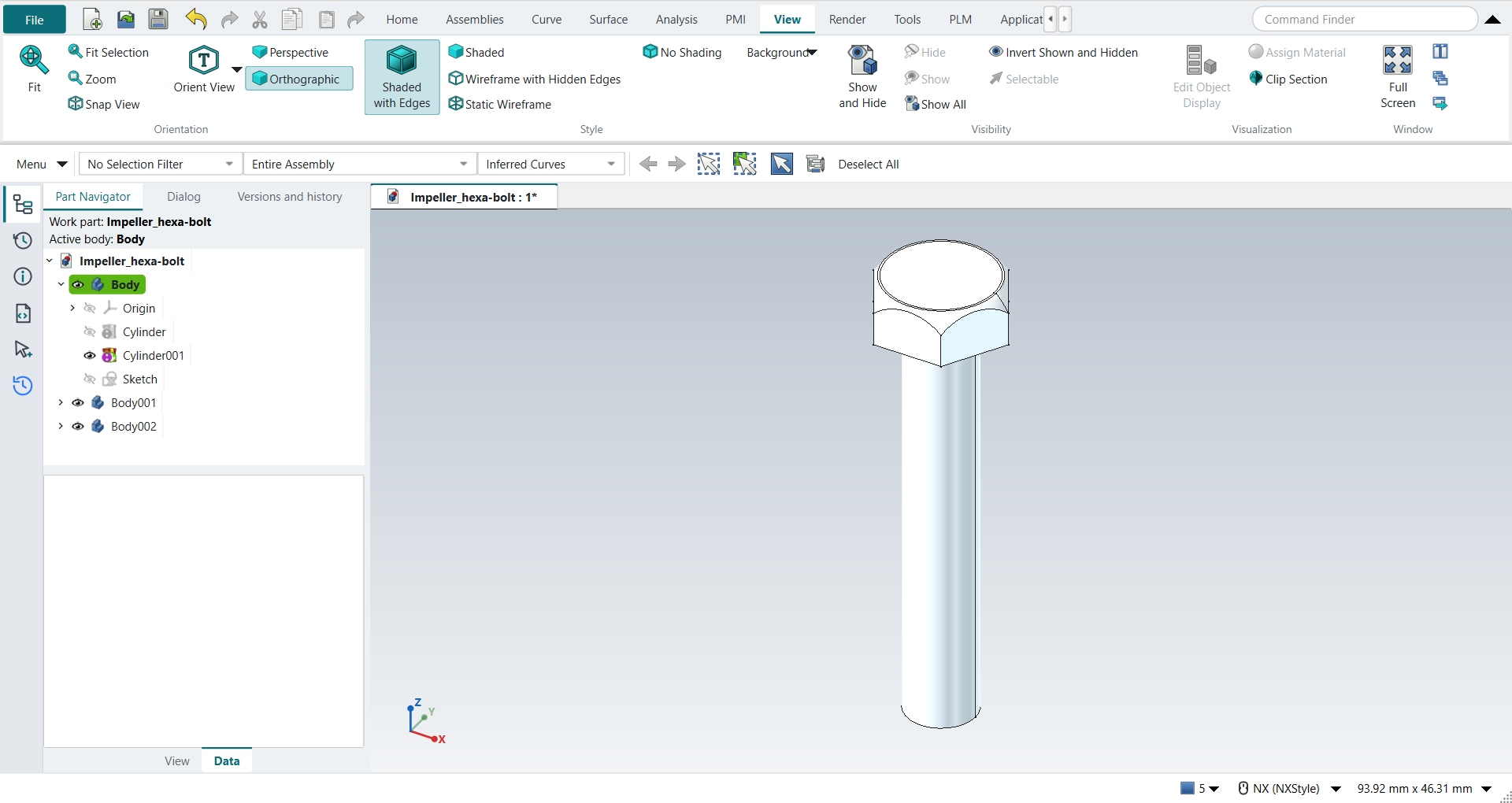
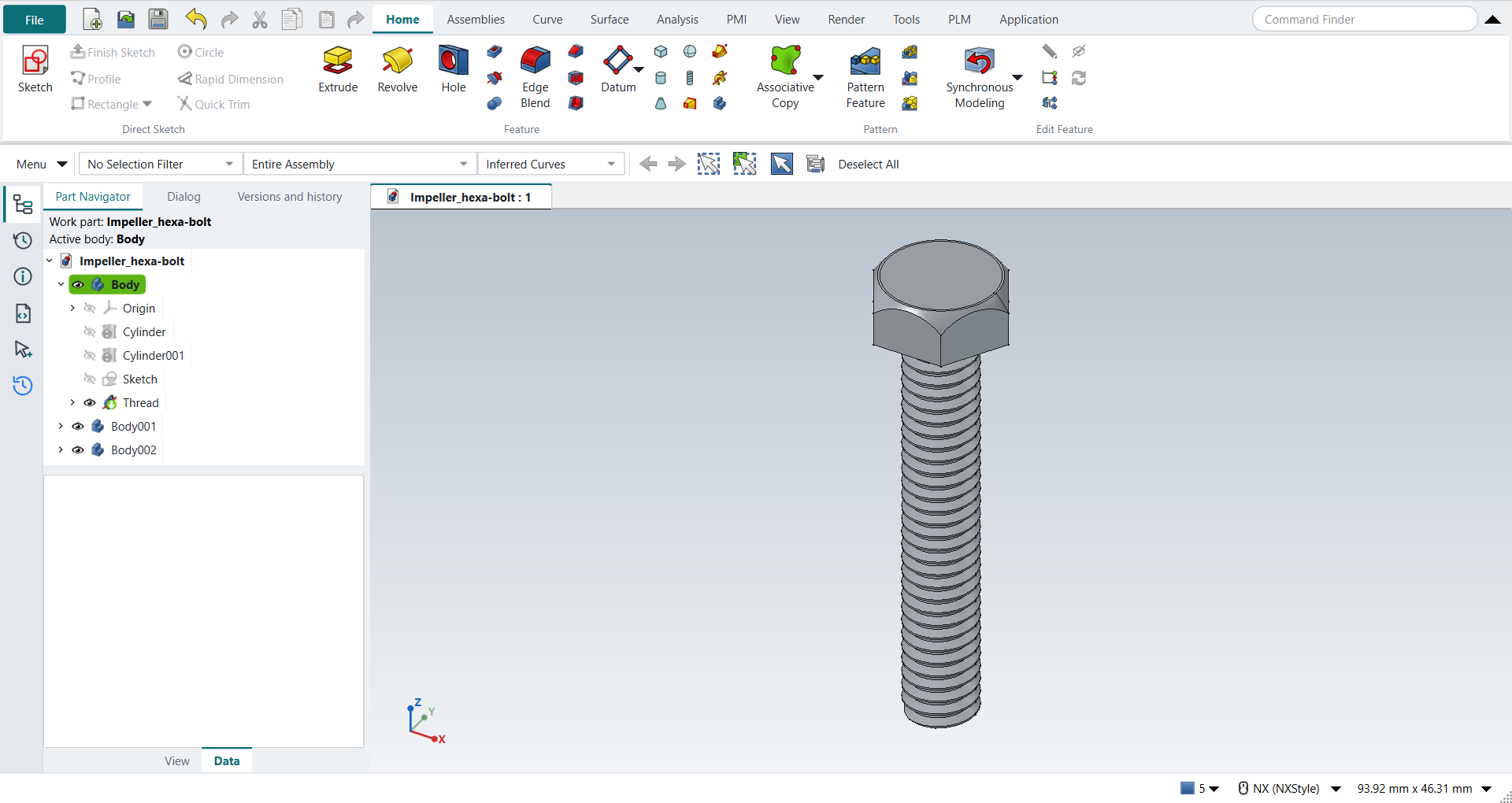
The replay
| # | In the book (NX) | In FreeCAD NX-Style | Result | Notes |
|---|---|---|---|---|
AQ1 |
Create a new file (Impeller_hexa-bolt) |
Ctrl+N, Model template |
same |
new document ['Unnamed1'] |
AQ2 |
Units in the New dialog (the book picks inches) |
metric part kept; book sizes typed in mm |
differs |
FreeCAD sets units in Preferences, not in the New dialog; NXStyle defaults to millimetres (document: Standard (mm, kg, s, °); 25.4 mm shows as 25.40 mm) |
AQ3 |
Save it as Impeller_hexa-bolt |
file name given once by script (the system file dialog is not driven); a change, then the Ctrl+S key |
same |
Impeller_hexa-bolt.FCStd rewritten by Ctrl+S: the file holds the change and the part is unmodified afterwards (modified before the key: True); FreeCAD format, not .prt |
AQ4 |
Cylinder: ZC, centre at the origin, Diameter 0.25, Height 1.5, OK |
ribbon 'Home › Feature', Type 'Axis, Diameter, and Height', Specify Vector 'ZC', XC/YC/ZC 0/0/0 typed, Diameter 6.35 and Height 38.1 typed, Boolean 'None', OK |
same |
volume 1206.6 mm^3, expected 1206.6; 1 solid(s); origin (0.0, 0.0, 0.0); one undo step ['Cylinder'] |
AQ5 |
Cylinder Ø0.387 x 0.0156: Arc/Ellipse/Sphere Center on the shank’s top face, Unite |
ribbon 'Home › Feature', Type 'Axis, Diameter, and Height', Specify Vector 'ZC', 'Arc/Ellipse/Sphere Center', MB1 at pixel (557, 303): Select Object (1) Arc/Ellipse/Sphere Center: 0, 0, 38.1, Diameter 9.8298 and Height 0.39624 typed, Boolean 'Unite', OK |
same |
volume 1236.7 mm^3, expected 1236.7; 1 solid(s); origin (0.0, 0.0, 38.1); one undo step ['Cylinder']; with Body |
AQ6 |
Polygon: centre at the top circle’s centre, 6 sides, Side Length 0.246, Rotation 0 |
the step’s top face (Face5) selected + ribbon 'Home › Direct Sketch > Sketch', P key ('Create Regular Polygon' 6 sides, OK; tool True), centre typed, corner typed, MB2 |
differs |
6 sides; corners all at the book hexagon (side 6.2484 mm, a corner on XC); the sketch on the top face True, its origin the circle’s centre. NX 12’s Polygon is a curve outside sketches; here it is drawn in a sketch on the face (NX 2212: Sketch > Polygon) |
AQ7 |
Extrude the hexagon, End Distance 0.1876 |
ribbon 'Home › Feature > Extrude', a side picked (click; Curve Rule Inferred Curves), dialog opened True; Boolean 'None', 'lengthEdit' = 4.76504 mm; OK |
same |
volume 483.34 mm^3, expected 483.34; z 38.496 to 43.261 mm; the hexagonal head is a body of its own (2 bodies), as the book’s later Intersect with the head alone needs |
AQ8 |
Cylinder Ø0.387 x 0.1875 on top of the Ø0.387 cylinder |
ribbon 'Home › Feature', Type 'Axis, Diameter, and Height', Specify Vector 'ZC', 'Arc/Ellipse/Sphere Center', MB1 at pixel (758, 286): Select Object (1) Arc/Ellipse/Sphere Center: 0, 0, 38.4962, Diameter 9.8298 and Height 4.7625 typed, Boolean 'None', OK |
same |
a body of its own, volume 361.42 mm^3, expected 361.42; seen in Static Wireframe (View › 'View › Style'), the hexagon around it; origin (0.0, 0.0, 38.49624); one undo step ['Cylinder'] |
AQ9 |
Sphere: centre at the bottom of the last cylinder, Diameter 0.55, Intersect, Target the hexagonal head, OK |
ribbon 'Home › Feature', Type 'Center Point and Diameter', 'Arc/Ellipse/Sphere Center', MB1 at pixel (758, 286): Select Object (1) Arc/Ellipse/Sphere Center: 0, 0, 38.4962, Diameter 13.97 typed, Boolean 'Intersect', Select Body 'Body001' from the list, OK |
same |
the head 475.09 mm^3, expected 475.09 (hexagon within the sphere); the other bodies unchanged; origin (0.0, 0.0, 38.49624); one undo step ['Sphere']; with Body001 |
AQ10 |
The screw before its thread: shank, head and the cylinder in it |
the 3 bodies together, compared with the book’s dimensions |
same |
same solid as the reference: 0 mm³ differ, box within 8.2e-14 mm, 13 faces (13 in the reference) |
AQ11 |
Thread: Detailed, Right Hand, the bolt’s shank, the values it shows kept, OK |
ribbon 'Home › Feature > Thread', Type 'Detailed', Rotation 'Right Hand', MB1 on the shank, OK |
same |
the dialog filled in 1/4-20 UNC: major 6.35, minor 4.97518, pitch 1.27, angle 60°, length 38.1 mm; the thread took 264.059 mm^3 from the shank, a helical sweep of that profile takes 264.060; 1 solid; undo Thread |
AQ12 |
Save the model |
file name given once by script (the system file dialog is not driven); a change, then the Ctrl+S key |
same |
Impeller_hexa-bolt.FCStd rewritten by Ctrl+S: the file holds the change and the part is unmodified afterwards (modified before the key: True); FreeCAD format, not .prt |
| Result | Means |
|---|---|
same |
The book’s NX steps work as written. |
differs |
It works, but the FreeCAD way is different; the notes say how. |
limit |
The book’s way fails in FreeCAD itself; a workaround follows in the next steps. |
missing |
FreeCAD has no such function; a stand-in follows. |
skipped |
Not replayed; the notes give the reason. |
FAILED |
Did not work. |
Before the thread, the screw’s bodies together are compared with the book’s dimensions. The thread is checked against the exact volume a helical sweep of its profile removes.
What differs from NX
-
NX 12 draws the hexagon with Insert > Curve > Polygon, a curve outside sketches. Here, as in NX 2212, the Polygon is drawn in a sketch on the face.
-
FreeCAD’s Polygon takes a corner, not a side length. For a hexagon the two are equal.
-
FreeCAD asks for the number of sides in a dialog of its own before the polygon is drawn.
-
The thread is a FreeCAD Subtractive Helix of the thread’s profile. See Modeling for the Thread command.