Tutorial AS: Arbor Press L-Bar
| Source |
Ming C. Leu, Wenjin Tao, Amir Ghazanfari and Krishna Kolan, NX 12 for Engineering Design (Missouri University of Science and Technology), section 4.7.3 (L-Bar). |
| You learn |
Block, Move Object (Distance), Cylinder and Block with Subtract and Select Body, Combine Subtract and Unite (Unite / Subtract), Edge Blend |
| Sizes |
the book’s, in inches, typed in millimetres. Blocks 65 × 65 × 285 and 182 × 65 × 85, the second lifted 200. Holes Ø35 and Ø66 along YC, a slot block 25 × 20 × 150. Blends R60 and R30. Four holes Ø8 × 20 along XC, and a block 60 × 20 × 66. |
The book’s figures on p. 86 show which edges the blends go on: R60 on the outer corner, R30 on the inner one.
Step by step
1. Two blocks, one moved up
Ctrl+N and save the part as Arborpress_L-bar.
Click Block and type Length 65, Width 65 and Height 285 at the origin. Click OK.
Click Block again for 182 × 65 × 85, also at the origin.
It becomes a body of its own (Boolean None).
Select the second block’s body in the Part Navigator and press Ctrl+T (Move Object). Choose Motion Distance, Result Move Original and the vector ZC, type Distance 5080 mm (200 in), and click OK.
2. The holes and the slot in the top block
Click Cylinder, choose YC, type the point (130, −5, 242) in, Diameter 35 and Height 100. Choose Subtract, choose the top block in Select Body, and click OK. Do the same for the Ø66 × 20 cylinder at (130, 22.5, 242).
Click Block for 25 × 20 × 150 at (157, 22.5, 180), with Boolean None. Make the top block the work body (double-click it in the Part Navigator), select the new block and click Unite / Subtract. Choose Cut and press MB2: that is NX’s Combine > Subtract with the top block as target.
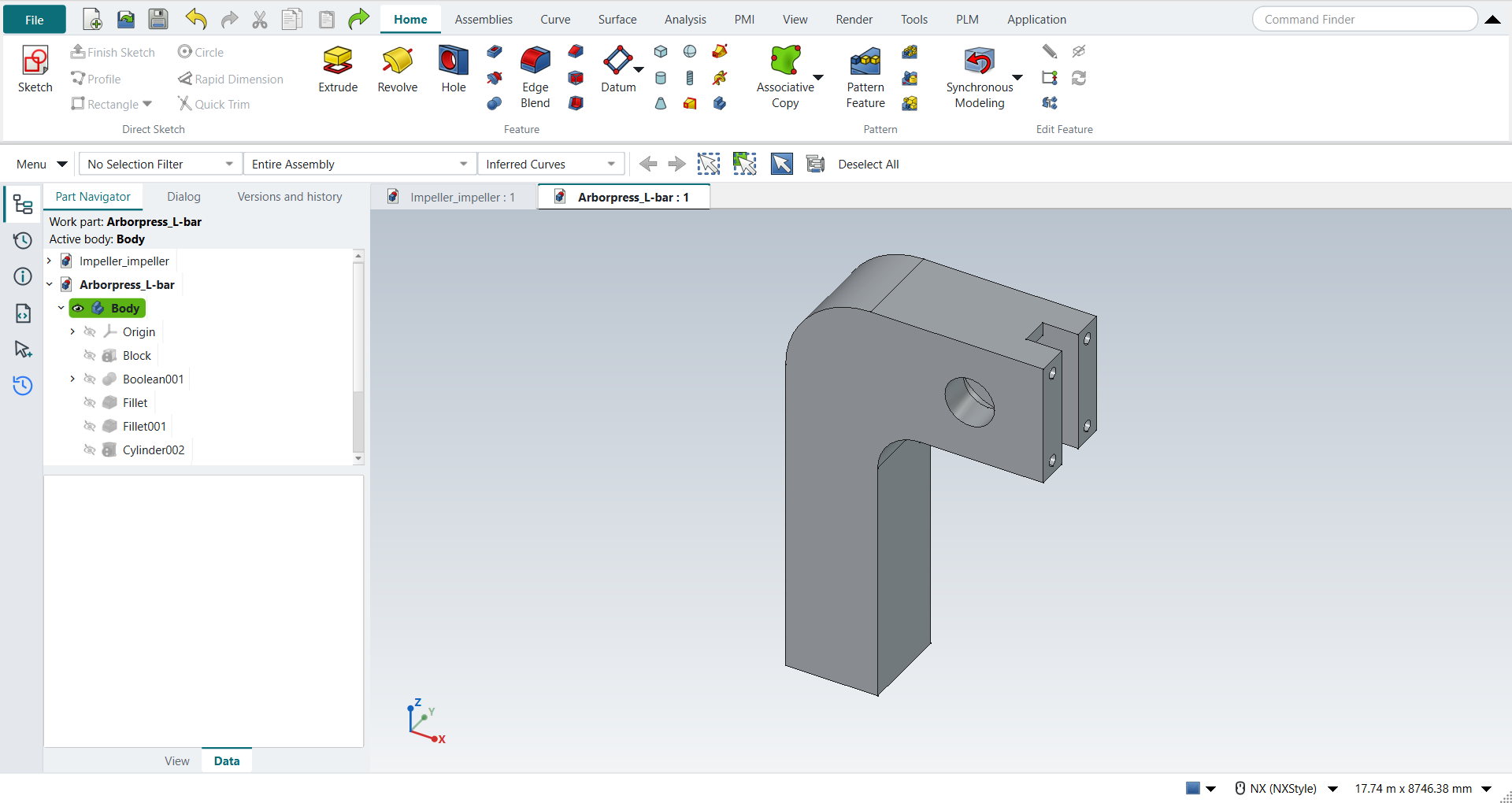
The replay
| # | In the book (NX) | In FreeCAD NX-Style | Result | Notes |
|---|---|---|---|---|
AS1 |
Create a new file (Arborpress_L-bar) |
Ctrl+N, Model template |
same |
new document ['Unnamed1'] |
AS2 |
Units in the New dialog (the book picks inches) |
metric part kept; book sizes typed in mm |
differs |
FreeCAD sets units in Preferences, not in the New dialog; NXStyle defaults to millimetres (document: Standard (mm, kg, s, °); 25.4 mm shows as 25.40 mm) |
AS3 |
Save it as Arborpress_L-bar |
file name given once by script (the system file dialog is not driven); a change, then the Ctrl+S key |
same |
Arborpress_L-bar.FCStd rewritten by Ctrl+S: the file holds the change and the part is unmodified afterwards (modified before the key: True); FreeCAD format, not .prt |
AS4 |
Block 65 x 65 x 285 at the origin |
ribbon 'Home › Feature', Type 'Origin and Edge Lengths', XC/YC/ZC 0/0/0 typed, length 65, width 65, height 285 (in) typed in mm, Boolean 'None', OK |
same |
Body: same solid as the reference: 0 mm³ differ, box within 0 mm, 6 faces (6 in the reference); origin (0.0, 0.0, 0.0); one undo step ['Block'] |
AS5 |
A second Block 182 x 65 x 85, also at the origin |
ribbon 'Home › Feature', Type 'Origin and Edge Lengths', XC/YC/ZC 0/0/0 typed, length 182, width 65, height 85 (in) typed in mm, Boolean 'None', OK |
same |
Body001: same solid as the reference: 0 mm³ differ, box within 0 mm, 6 faces (6 in the reference); origin (0.0, 0.0, 0.0); one undo step ['Block'] |
AS6 |
Edit > Move Object: the second block, Motion Distance, ZC, Distance 200, Move Original, OK |
the block’s body selected (Part Navigator), Ctrl+T, Motion 'Distance', Result 'Move Original', Specify Vector 'ZC', Distance 5080 mm typed, OK |
same |
same solid as the reference: 0 mm³ differ, box within 0 mm, 6 faces (6 in the reference); undo Move Object. The block moves inside its body (the body stays where it is), so a later Unite / Subtract into it cuts where it is |
AS7 |
Cylinder along YC at (130, -5, 242), Ø35 x 100, Subtract from the top block |
ribbon 'Home › Feature', Type 'Axis, Diameter, and Height', Specify Vector 'YC', XC/YC/ZC 3302/-127/6146.8 typed, diameter 35, height 100 (in) typed in mm, Boolean 'Subtract', Select Body 'Body001' from the list, OK |
same |
Body001: same solid as the reference: 0 mm³ differ, box within 2.7e-12 mm, 7 faces (7 in the reference); origin (3302.0, -127.0, 6146.8); one undo step ['Cylinder']; with Body001 |
AS8 |
Cylinder along YC at (130, 22.5, 242), Ø66 x 20, Subtract from the same block |
ribbon 'Home › Feature', Type 'Axis, Diameter, and Height', Specify Vector 'YC', XC/YC/ZC 3302/571.5/6146.8 typed, diameter 66, height 20 (in) typed in mm, Boolean 'Subtract', Select Body 'Body001' from the list, OK |
same |
Body001: same solid as the reference: 0 mm³ differ, box within 2.7e-12 mm, 11 faces (11 in the reference); origin (3302.0, 571.5, 6146.8); one undo step ['Cylinder']; with Body001 |
AS9 |
Block 25 x 20 x 150 at (157, 22.5, 180) |
ribbon 'Home › Feature', Type 'Origin and Edge Lengths', XC/YC/ZC 3987.8/571.5/4572 typed, length 25, width 20, height 150 (in) typed in mm, Boolean 'None', OK |
same |
Body002: same solid as the reference: 0 mm³ differ, box within 9.1e-13 mm, 6 faces (6 in the reference); origin (3987.8, 571.5, 4572.0); one undo step ['Block'] |
AS10 |
Combine > Subtract: Target the block with the two holes, Tool the new block |
the target made the work body, the tool selected (Part Navigator) + ribbon 'Home › Feature > Unite / Subtract', type 'Cut', MB2 = OK |
same |
same solid as the reference: 0 mm³ differ, box within 1.8e-12 mm, 14 faces (14 in the reference) |
AS11 |
Combine > Unite: the two blocks |
the target made the work body, the tool selected (Part Navigator) + ribbon 'Home › Feature > Unite / Subtract', type 'Fuse', MB2 = OK |
same |
same solid as the reference: 0 mm³ differ, box within 1.4e-12 mm, 16 faces (16 in the reference) |
AS12 |
Edge Blend, Radius 60: the outer corner where the blocks meet |
Edge39 selected + ribbon 'Home › Feature > Edge Blend', 'filletRadius' = 1524 mm, MB2 = OK |
same |
same solid as the reference: 0 mm³ differ, box within 1.8e-12 mm, 17 faces (17 in the reference) |
AS13 |
Edge Blend, Radius 30: the inner corner |
Edge32 selected + ribbon 'Home › Feature > Edge Blend', 'filletRadius' = 762 mm, MB2 = OK |
same |
same solid as the reference: 0 mm³ differ, box within 1.8e-12 mm, 18 faces (18 in the reference) |
AS14 |
Cylinder #1 along XC at (162, 11.25, 210), Ø8 x 20, Subtract |
ribbon 'Home › Feature', Type 'Axis, Diameter, and Height', Specify Vector 'XC', XC/YC/ZC 4114.8/285.75/5334 typed, diameter 8, height 20 (in) typed in mm, Boolean 'Subtract', Select Body 'Body' from the list, OK |
same |
Body: same solid as the reference: 0 mm³ differ, box within 2.3e-12 mm, 20 faces (20 in the reference); origin (4114.8, 285.75, 5334.0); one undo step ['Cylinder']; with Body |
AS15 |
Cylinder #2 along XC at (162, 11.25, 275), Ø8 x 20, Subtract |
ribbon 'Home › Feature', Type 'Axis, Diameter, and Height', Specify Vector 'XC', XC/YC/ZC 4114.8/285.75/6985 typed, diameter 8, height 20 (in) typed in mm, Boolean 'Subtract', Select Body 'Body' from the list, OK |
same |
Body: same solid as the reference: 0 mm³ differ, box within 7.7e-12 mm, 22 faces (22 in the reference); origin (4114.8, 285.75, 6985.0); one undo step ['Cylinder']; with Body |
AS16 |
Cylinder #3 along XC at (162, 53.75, 210), Ø8 x 20, Subtract |
ribbon 'Home › Feature', Type 'Axis, Diameter, and Height', Specify Vector 'XC', XC/YC/ZC 4114.8/1365.25/5334 typed, diameter 8, height 20 (in) typed in mm, Boolean 'Subtract', Select Body 'Body' from the list, OK |
same |
Body: same solid as the reference: 0 mm³ differ, box within 5.9e-12 mm, 24 faces (24 in the reference); origin (4114.8, 1365.25, 5334.0); one undo step ['Cylinder']; with Body |
AS17 |
Cylinder #4 along XC at (162, 53.75, 275), Ø8 x 20, Subtract |
ribbon 'Home › Feature', Type 'Axis, Diameter, and Height', Specify Vector 'XC', XC/YC/ZC 4114.8/1365.25/6985 typed, diameter 8, height 20 (in) typed in mm, Boolean 'Subtract', Select Body 'Body' from the list, OK |
same |
Body: same solid as the reference: 0 mm³ differ, box within 1.4e-11 mm, 26 faces (26 in the reference); origin (4114.8, 1365.25, 6985.0); one undo step ['Cylinder']; with Body |
AS18 |
Block 60 x 20 x 66 at (130, 22.5, 209.5), Subtract from the top block |
ribbon 'Home › Feature', Type 'Origin and Edge Lengths', XC/YC/ZC 3302/571.5/5321.3 typed, length 60, width 20, height 66 (in) typed in mm, Boolean 'Subtract', Select Body 'Body' from the list, OK |
same |
Body: same solid as the reference: 0 mm³ differ, box within 1.2e-11 mm, 29 faces (29 in the reference); origin (3302.0, 571.5, 5321.3); one undo step ['Block']; with Body |
AS19 |
The L-bar |
compared with the book’s dimensions built by the Part API |
same |
same solid as the reference: 0 mm³ differ, box within 1.2e-11 mm, 29 faces (29 in the reference) |
AS20 |
Save and close the file |
file name given once by script (the system file dialog is not driven); a change, then the Ctrl+S key |
same |
Arborpress_L-bar.FCStd rewritten by Ctrl+S: the file holds the change and the part is unmodified afterwards (modified before the key: True); FreeCAD format, not .prt |
| Result | Means |
|---|---|
same |
The book’s NX steps work as written. |
differs |
It works, but the FreeCAD way is different; the notes say how. |
limit |
The book’s way fails in FreeCAD itself; a workaround follows in the next steps. |
missing |
FreeCAD has no such function; a stand-in follows. |
skipped |
Not replayed; the notes give the reason. |
FAILED |
Did not work. |
Each step is compared with the book’s dimensions built by FreeCAD’s Part API.
What differs from NX
-
NX’s Combine > Subtract and Unite pick a target and tools in one dialog. NX-Style uses FreeCAD’s Unite / Subtract: make the target the work body, select the tool, and choose the type.
-
Move Object moves a PartDesign body’s features, not the body’s placement. FreeCAD’s Unite / Subtract ignores a moved target body’s placement; see Move Object.