Tutorial AR: Hexagonal Nut
| Source |
Ming C. Leu, Wenjin Tao, Amir Ghazanfari and Krishna Kolan, NX 12 for Engineering Design (Missouri University of Science and Technology), section 4.7.2 (Hexagonal Nut). |
| You learn |
Polygon, Sphere at a typed point with Intersect, Mirror Feature through a face of the body, Cylinder with Subtract, Chamfer |
| Sizes |
the book’s, in inches, typed in millimetres. Hexagon side 0.28685, extruded 0.125. Sphere Ø0.57 at (0, 0, 0.125). Hole Ø0.25 × 1 at the origin. Chamfer 0.0436. |
Step by step
1. The hexagon
Ctrl+N and save the part as Impeller_hexa-nut.
Click Sketch, pick the XC-YC plane and press MB2.
Press P for Polygon, type 6 sides, then type the centre (0, 0) and the corner: length 7.28599 mm (0.28685 in) at angle 0.
Press MB2, then Ctrl+Q.
Click Extrude, click a side of the hexagon, and type 3.175 mm (0.125 in). Click OK.
2. Half a nut
Click Sphere, keep Center Point and Diameter, and type XC 0, YC 0, ZC 3.175 (0.125 in). Type Diameter 14.478 (0.57 in), choose Intersect, and click OK.
3. The other half
Select the Intersect in the Part Navigator and click Mirror Feature (Home › Pattern). Choose Transform body, so that the whole half is mirrored. In the plane list choose Select reference… and pick the half’s flat top face. FreeCAD shows the origin planes while you pick, and one of them is in front of the face: press and hold MB1 and choose the face in QuickPick. Press MB2. The mirrored half is united with the body, so the book’s Unite step has nothing left to do.
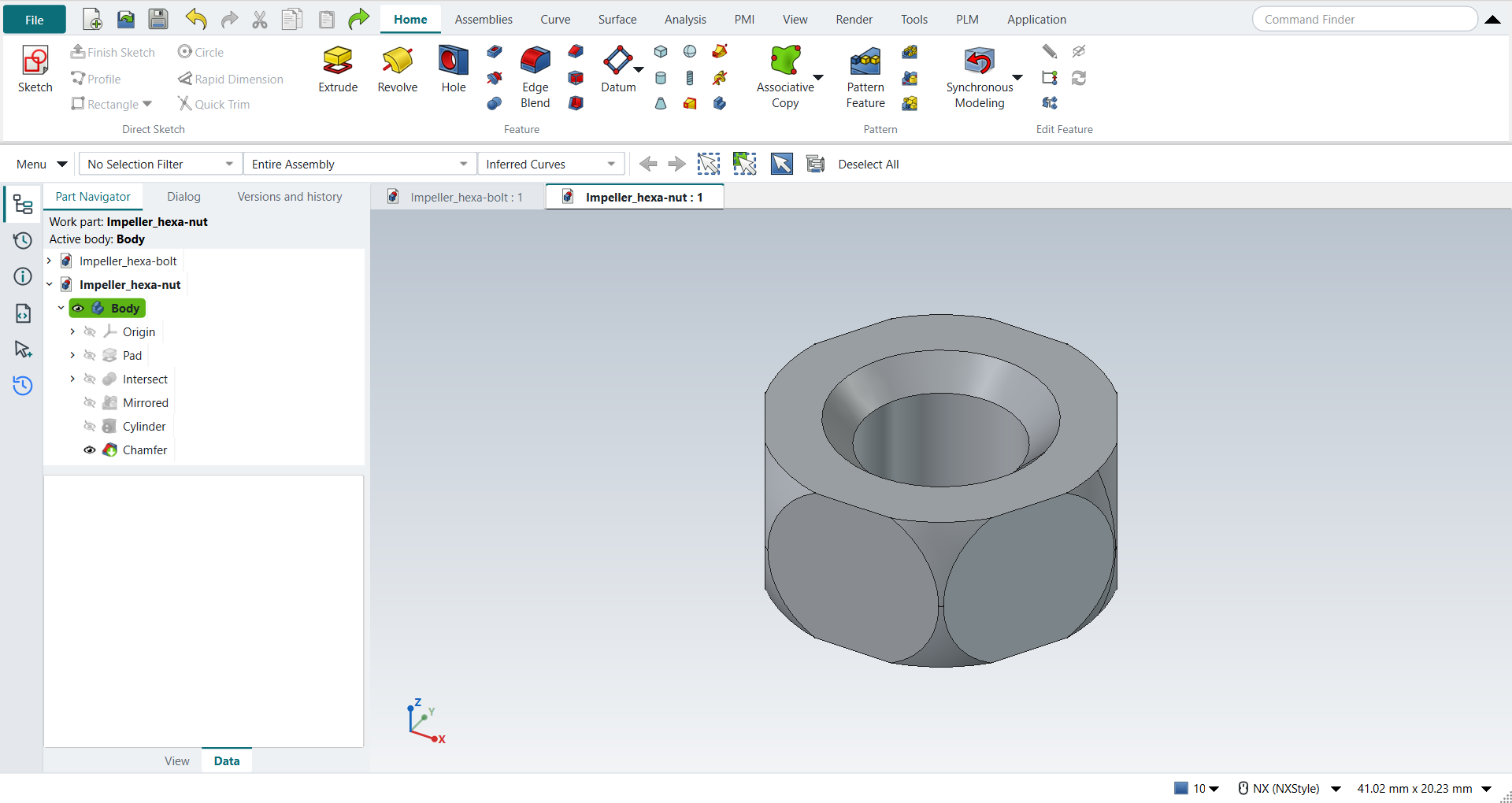
The replay
| # | In the book (NX) | In FreeCAD NX-Style | Result | Notes |
|---|---|---|---|---|
AR1 |
Create a new file (Impeller_hexa-nut) |
Ctrl+N, Model template |
same |
new document ['Unnamed2'] |
AR2 |
Units in the New dialog (the book picks inches) |
metric part kept; book sizes typed in mm |
differs |
FreeCAD sets units in Preferences, not in the New dialog; NXStyle defaults to millimetres (document: Standard (mm, kg, s, °); 25.4 mm shows as 25.40 mm) |
AR3 |
Save it as Impeller_hexa-nut |
file name given once by script (the system file dialog is not driven); a change, then the Ctrl+S key |
same |
Impeller_hexa-nut.FCStd rewritten by Ctrl+S: the file holds the change and the part is unmodified afterwards (modified before the key: True); FreeCAD format, not .prt |
AR4 |
Polygon: 6 sides, Side Length 0.28685, at the origin |
ribbon 'Home › Direct Sketch > Sketch' on 'XY-plane (Base plane)', P key ('Create Regular Polygon' 6 sides, OK; tool True), centre typed, corner typed, MB2 |
differs |
6 sides; corners at the book’s hexagon (side 7.28599 mm, a corner on XC): all six. NX 12’s Insert > Curve > Polygon is a curve outside sketches; NX-Style draws the polygon in a sketch (NX 2212: Sketch > Polygon), whose corner is typed as the circumradius, which a hexagon’s side length equals |
AR5 |
Extrude the hexagon, End Distance 0.125 |
ribbon 'Home › Feature > Extrude', a side picked (click; Curve Rule Inferred Curves), dialog opened True; Boolean 'None', 'lengthEdit' = 3.175 mm; OK clicked |
same |
volume 437.9 mm^3, expected 437.9; 1 solid(s); the part’s first solid |
AR6 |
Sphere: Center Point (0, 0, 0.125) in the Point Dialog, Diameter 0.57, Boolean Intersect, OK |
ribbon 'Home › Feature', Type 'Center Point and Diameter', XC/YC/ZC 0/0/3.175 typed, Diameter 14.478 typed, Boolean 'Intersect', OK |
same |
volume 433.2 mm^3, expected 433.2; 1 solid(s); origin (0.0, 0.0, 3.175); one undo step ['Sphere']; with Body |
AR7 |
Edit > Transform: the model, Mirror Through a Plane, its flat side, Copy |
the Intersect selected + ribbon 'Home › Pattern > Mirror Feature', Transform body True, plane 'Select reference…' and the flat top face by QuickPick (['Body › Origin › XZ-plane', 'Body › Origin › YZ-plane', 'Face4 of Body › Intersect', 'Face2 of Body › Intersect']) (Face4), MB2 = OK |
differs |
plane shown 'Intersect:Face4'; 1 solid, 866.4 mm^3 (twice 433.2), z -0.000 to 6.350 mm. NX’s Transform copies the body unparametrised; Mirror Feature keeps the copy following the half |
AR8 |
Combine > Unite: the two halves |
nothing to do |
differs |
Mirror Feature with Transform body unites the copy with the body itself: the nut is one solid |
AR9 |
Cylinder: ZC, at the origin, Diameter 0.25, Height 1, Subtract from the nut, OK |
ribbon 'Home › Feature', Type 'Axis, Diameter, and Height', Specify Vector 'ZC', XC/YC/ZC 0/0/0 typed, Diameter 6.35 and Height 25.4 typed, Boolean 'Subtract', OK |
same |
volume 665.3 mm^3, expected 665.3; 1 solid(s); origin (0.0, 0.0, 0.0); one undo step ['Cylinder']; with Body |
AR10 |
Chamfer: the two inner edges, Distance 0.0436, OK |
['Edge14', 'Edge54'] selected + ribbon 'Home › Feature > Chamfer', 'chamferSize' = 1.10744 mm, MB2 = OK |
same |
volume 638.0 mm^3, expected 638.0; 1 solid(s) |
AR11 |
The nut |
compared with the book’s dimensions |
same |
same solid as the reference: 0 mm³ differ, box within 7.1e-15 mm, 25 faces (25 in the reference) |
AR12 |
Save the model |
file name given once by script (the system file dialog is not driven); a change, then the Ctrl+S key |
same |
Impeller_hexa-nut.FCStd rewritten by Ctrl+S: the file holds the change and the part is unmodified afterwards (modified before the key: True); FreeCAD format, not .prt |
| Result | Means |
|---|---|
same |
The book’s NX steps work as written. |
differs |
It works, but the FreeCAD way is different; the notes say how. |
limit |
The book’s way fails in FreeCAD itself; a workaround follows in the next steps. |
missing |
FreeCAD has no such function; a stand-in follows. |
skipped |
Not replayed; the notes give the reason. |
FAILED |
Did not work. |
The finished nut is compared with the book’s dimensions built by FreeCAD’s Part API.
What differs from NX
-
NX 12 draws the hexagon with Insert > Curve > Polygon. Here, as in NX 2212, it is drawn in a sketch.
-
The book mirrors the half with Edit > Transform > Mirror Through a Plane, Copy, then unites the two bodies. NX-Style’s Mirror Feature in Transform body mode does both, and the copy keeps following the half.