Tutorial AT: Arbor Press Rack
| Source |
Ming C. Leu, Wenjin Tao, Amir Ghazanfari and Krishna Kolan, NX 12 for Engineering Design (Missouri University of Science and Technology), section 4.7.4 (Rack). |
| You learn |
Rectangle, Extrude, a tapered cut with Extrude (Subtract), Pattern Feature (Linear, Count and Pitch), the Point Dialog’s Between Two Points |
| Sizes |
the book’s, in inches, typed in millimetres. A rectangle from (0, 0) to (240, 25), extruded 20. A tooth space 35 long across the bar, 6 wide and 5.034 deep, its walls tapered 14.5°, its centre lines 37.8 from the end and 10 from the side. 19 of them at a pitch of 9.4. A hole Ø10, 20 deep, into the far end. |
The book gives the pocket’s sizes only in its figure (p. 89); they are listed above.
Step by step
1. The bar
Ctrl+N and save the part as Arborpress_rack. End turns the view to Isometric.
Click Sketch, pick the XC-YC plane and press MB2.
Press R for Rectangle.
Type the first corner (0, 0) in the fields beside the pointer, then the opposite corner (6096, 635) mm, which is (240, 25) in.
Press MB2, then Ctrl+Q.
Click Extrude, click a side of the rectangle, and type 508 mm (20 in). Click OK.
2. One tooth space
Select the bar’s top face and click Sketch. Draw a Rectangle from (34.8, −7.5) to (40.8, 27.5) in, typed in mm. That is the book’s pocket: 6 wide along XC and 35 long across the bar, centred 37.8 from the end and 10 from the side. It runs out over both sides of the bar. Press MB2, then Ctrl+Q.
Click Extrude (Subtract), click a side of the rectangle (QuickPick lists it where it lies on the face), type the length 127.8636 mm (5.034 in) and the taper −14.5°, and click OK.
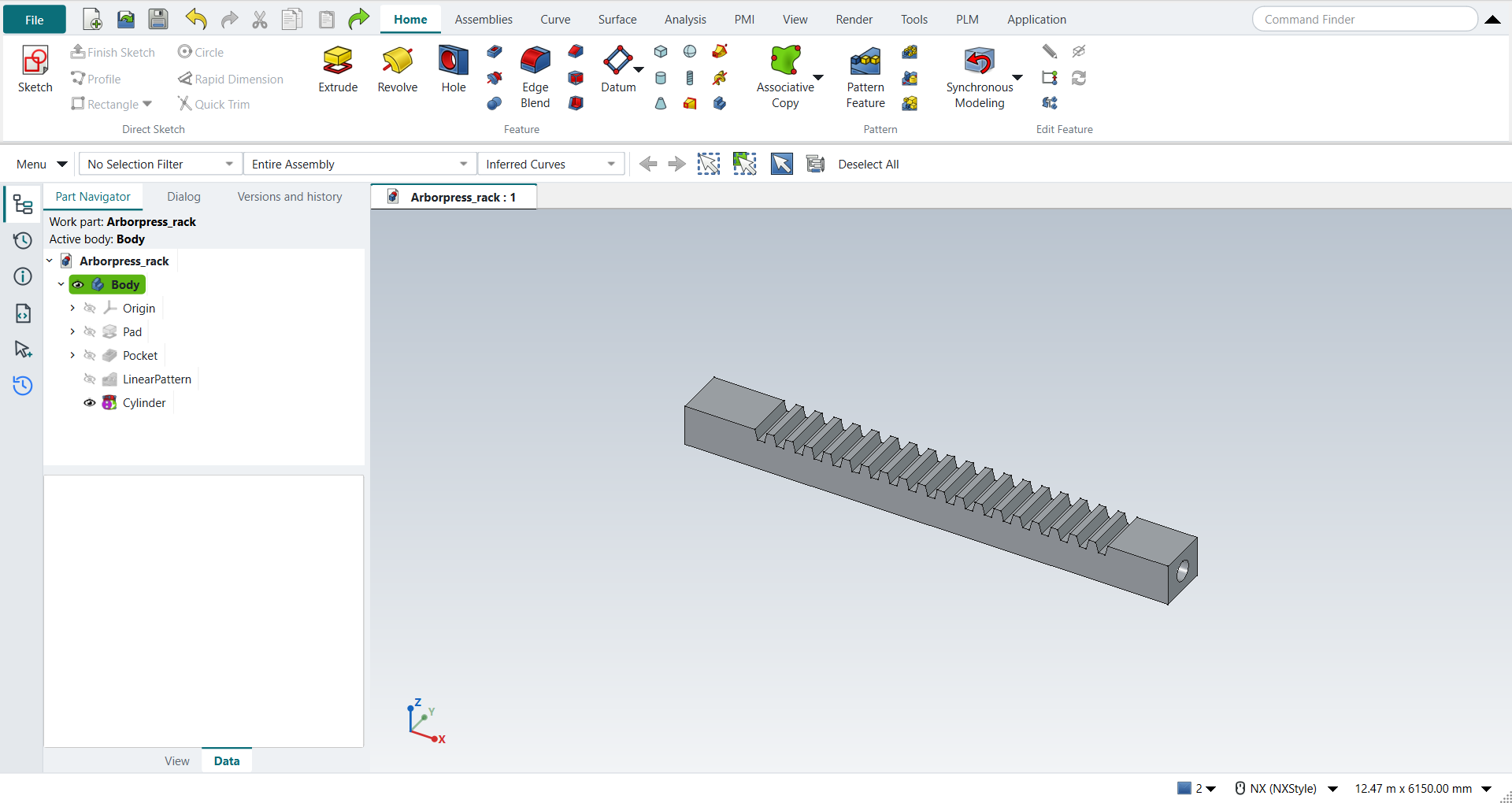
The replay
| # | In the book (NX) | In FreeCAD NX-Style | Result | Notes |
|---|---|---|---|---|
AT1 |
Create a new file (Arborpress_rack) |
Ctrl+N, Model template |
same |
new document ['Unnamed2'] |
AT2 |
Units in the New dialog (the book picks inches) |
metric part kept; book sizes typed in mm |
differs |
FreeCAD sets units in Preferences, not in the New dialog; NXStyle defaults to millimetres (document: Standard (mm, kg, s, °); 25.4 mm shows as 25.40 mm) |
AT3 |
Save it as Arborpress_rack |
file name given once by script (the system file dialog is not driven); a change, then the Ctrl+S key |
same |
Arborpress_rack.FCStd rewritten by Ctrl+S: the file holds the change and the part is unmodified afterwards (modified before the key: True); FreeCAD format, not .prt |
AT4 |
Rectangle: corner 1 (0, 0, 0), corner 2 (240, 25, 0) |
ribbon 'Home › Direct Sketch > Sketch' on 'XY-plane (Base plane)', R key (tool True), first corner typed, opposite corner typed as X, Y, MB2 |
differs |
4 lines; corners all at the book. NX 12’s Insert > Curve > Rectangle is a curve outside sketches; NX-Style draws it in a sketch (NX 2212: Sketch > Rectangle) |
AT5 |
Extrude the rectangle along ZC, Start 0, End 20 |
ribbon 'Home › Feature > Extrude', a side picked (click; Curve Rule Inferred Curves), dialog opened True; Boolean 'None', 'lengthEdit' = 508 mm; OK clicked |
same |
same solid as the reference: 0 mm³ differ, box within 0 mm, 6 faces (6 in the reference) |
AT6 |
Pocket: Rectangular, on the top face; Length 35, Width 6; Perpendicular 37.8 from the end and 10 from the side |
the top face (Face6) selected + ribbon 'Home › Direct Sketch > Sketch', R key (tool True), first corner typed, opposite corner typed as length, width, MB2 |
differs |
4 lines, corners as the book places the pocket; on the top face True. NX 12’s Pocket is a legacy feature (positioned with Perpendicular); NX 2212 cuts it with Extrude (Subtract) from a sketched rectangle, whose corners are typed from the pocket’s size and position |
AT7 |
Depth 5.034, Taper Angle 14.5, OK |
ribbon 'Home › Feature > Extrude (Subtract)', a side picked (QuickPick; Curve Rule Inferred Curves), dialog opened True; Boolean 'Subtract', 'lengthEdit' = 127.864 mm, 'taperEdit' = -14.5°; OK |
same |
same solid as the reference: 0 mm³ differ, box within 0 mm, 10 faces (10 in the reference); FreeCAD’s taper is negative for walls that close in with depth, as NX’s pocket’s do |
AT8 |
Pattern Feature: the pocket, Linear, XC, Count 19, Pitch Distance 9.4, OK |
the Extrude (Subtract) selected + ribbon 'Home › Pattern > Pattern Feature', {'axis': 'Base X-axis', 'mode': 'Spacing', 'count typed': 19, 'spacing': 9.4}, MB2 = OK |
same |
same solid as the reference: 0 mm³ differ, box within 0 mm, 82 faces (82 in the reference) |
AT9 |
Cylinder along -XC at the end face’s centre (Between Two Points), Ø10 x 20, Subtract |
ribbon 'Home › Feature', Type 'Axis, Diameter, and Height', Specify Vector '-XC', 'Between Two Points', MB1 near the end face’s corners (240, 0, 0) and (240, 25, 20) at pixels [(509, 381), (593, 187)]: Select Object (0) Between Two Points: 6096, 317.5, 254, Diameter 254 and Height 508 typed, Boolean 'Subtract', OK |
same |
same solid as the reference: 0 mm³ differ, box within 2e-12 mm, 84 faces (84 in the reference); origin (6096.0, 317.5, 254.0); one undo step ['Cylinder']; with Body |
AT10 |
The rack |
compared with the book’s dimensions built by the Part API |
same |
same solid as the reference: 0 mm³ differ, box within 2e-12 mm, 84 faces (84 in the reference) |
AT11 |
Save and close the model |
file name given once by script (the system file dialog is not driven); a change, then the Ctrl+S key |
same |
Arborpress_rack.FCStd rewritten by Ctrl+S: the file holds the change and the part is unmodified afterwards (modified before the key: True); FreeCAD format, not .prt |
| Result | Means |
|---|---|
same |
The book’s NX steps work as written. |
differs |
It works, but the FreeCAD way is different; the notes say how. |
limit |
The book’s way fails in FreeCAD itself; a workaround follows in the next steps. |
missing |
FreeCAD has no such function; a stand-in follows. |
skipped |
Not replayed; the notes give the reason. |
FAILED |
Did not work. |
The finished rack is compared with the book’s dimensions built by FreeCAD’s Part API.
What differs from NX
-
NX 12 draws the rectangle with Insert > Curve > Rectangle, a curve outside sketches. Here, as in NX 2212, it is drawn in a sketch.
-
NX 12’s Rectangular Pocket is a legacy feature, positioned with Perpendicular distances to two edges. NX 2212 cuts it with Extrude (Subtract) from a sketched rectangle; its corners come from the pocket’s size and position.
-
FreeCAD’s taper is negative for walls that close in with depth. NX’s pocket’s taper of 14.5° is −14.5° here.