Tutorial E: Saddle Bracket
| Book |
Shih, Parametric Modeling with Siemens NX, ch. 4 |
| You learn |
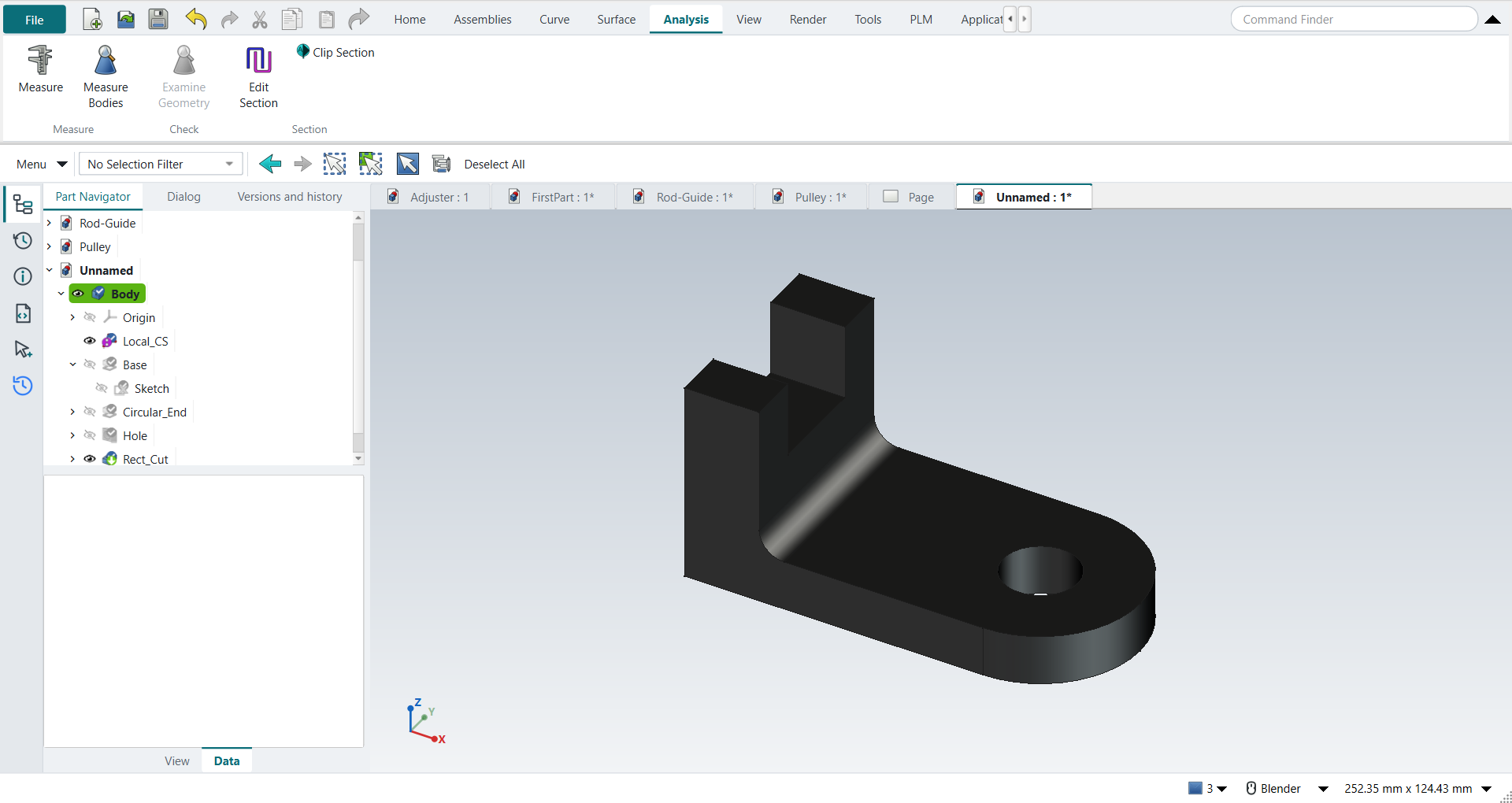
Datum CSYS first (BORN), Symmetric extrude, Project Curve, renaming in the Part Navigator, Edit Parameters, Assign Material, Measure Bodies |
| Sizes |
The text gives 63.5, 12.7, 50.8, Ø19.05 and R6.35 mm (2.5, 0.5, 2.0, Ø0.75 and R0.25 in). The L profile is in figures only, so it is this project’s own: 76.2 mm long, a 12.7 mm base, a 19.05 × 50.8 mm upright, a 25.4 × 19.05 mm notch. |
In short
-
Datum CSYS first; FreeCAD asks whether to continue without an attachment; a Body has its own origin anyway.
-
The L profile, extruded Symmetric 63.5 mm (the value is the total width, as in NX since NX 1926).
-
A circular end tied to a projected edge.
-
F2 in the Part Navigator to name the features.
-
Three design changes: the width 63.5 → 50.8 mm, Until Next → Through All, and a fillet added to the first sketch.
-
Render › Material › Assign Material: steel. Analysis › Measure › Measure Bodies: 86,504.5 mm³, 7900 kg/m³, 0.6834 kg.
Step by step
| # | In the book (NX) | In FreeCAD NX-Style | Result | Notes |
|---|---|---|---|---|
E1 |
File > New |
Ctrl+N |
same |
|
E2 |
BORN: Datum CSYS at the WCS, OK |
ribbon 'Home > Datum > Datum CSYS', MB2 = OK, Yes to FreeCAD’s question |
differs |
a FreeCAD Body already starts with its own origin (the BORN idea built in). With nothing selected FreeCAD asks 'no attachment mode fits the references, continue?'; NX places the CSYS at the WCS without asking |
E3 |
Extrude (X), XZ plane, OK |
X key, plane row + MB2 |
same |
picked XZ-plane (Base plane) |
E4 |
Profile (Z): the L-shaped outline, MB2 |
Z key + 7 MB1 clicks + MB2; sizes applied |
same |
tool True; 6 curves; ended True |
E5 |
Start = Symmetric Value, distance 2.5, OK |
'Symmetric', 'lengthEdit' = 63.5 mm, MB2 = OK |
same |
volume 107540.1 mm^3, expected 107540.1; 1 solid(s); width -31.75 .. 31.75 mm (NX 1926+ and FreeCAD both treat the symmetric distance as the total) |
E6 |
Extrude, bottom face as the sketch plane |
select face + ribbon 'Home › Feature > Extrude' |
same |
Face1 |
E7 |
Project Curve: the bottom right edge, OK |
ribbon 'Project Curve' + MB1 on the edge + MB2 |
same |
picked Edge2 in the graphics window |
E8 |
Circle: centre at the edge midpoint, through the top corner |
O key + 2 MB1 clicks + MB2; midpoint and corner as constraints |
same |
solver result 0 (0 = solved); NX snaps to the midpoint and corner while drawing, FreeCAD records them as constraints |
E9 |
Finish the section: circle and projected edge |
select the projected line + ribbon 'Convert To/From Reference' |
differs |
FreeCAD 1.1 projects a picked edge as defining geometry, so the profile had 2 curves and Extrude would report 'Wire is not closed'. NX builds regions from the circle and its diameter; in FreeCAD the projected line has to become construction geometry first |
E10 |
Reverse Direction, distance 0.5, Boolean Unite, OK |
'checkBoxReversed' on, 'lengthEdit' = 12.7 mm, MB2 = OK |
same |
volume 127650.1 mm^3, expected 127650.1; 1 solid(s); lowest point z = -0.00 mm |
E11 |
Rename in the Part Navigator: Base, Circular_End |
select + F2, type, Enter |
differs |
NX: click the name twice or MB3 > Rename; FreeCAD: F2 or MB3 > Rename |
E12 |
Design change: Base distance 2.5 → 2.0, OK, F5 |
Base selected + ribbon 'Home › Edit Feature > Edit Parameters' (dialog True), 'lengthEdit' = 50.8 mm, MB2 = OK, F5 |
same |
volume 98902.5 mm^3, expected 98902.5; 1 solid(s); NX edits the value from MB3 > Show Dimensions, FreeCAD reopens the Extrude dialog. Circular_End follows the narrower base (its circle is tied to the projected edge) |
E13 |
Hole: Simple, Normal to Face, on the top face |
select face + ribbon 'Home › Feature > Hole' |
differs |
FreeCAD’s Hole drills at circle centres in a sketch on the face |
E14 |
Point: the centre of the top arc |
O key + MB1 clicks + MB2; centre tied to the arc |
differs |
NX picks the arc centre directly; FreeCAD sketches a circle on it (Edge19 projected) |
E15 |
Diameter 0.75, Depth Limit = Through Body, OK |
'Diameter' = 19.05 mm, 'Through all', MB2 = OK |
same |
volume 95282.7 mm^3, expected 95282.7; 1 solid(s) |
E16 |
Extrude on the right vertical face of the upright |
select face + ribbon 'Home › Feature > Extrude (Subtract)' |
differs |
Face5; the button starts Extrude with Boolean Subtract chosen |
E17 |
Rectangle at the upper edge, MB2; three dimensions |
R key + 2 MB1 clicks + MB2; sizes applied |
same |
tool True; 4 curves; ended True |
E18 |
Boolean Subtract, End = Until Next, OK |
'To first', MB2 = OK |
same |
volume 86064.9 mm^3, expected 86064.9; 1 solid(s); FreeCAD calls Until Next 'To first' |
E19 |
Rename the cut Rect_Cut |
select + F2, type, Enter |
differs |
|
E20 |
Edit with Rollback: End = Through All, OK |
Rect_Cut selected + ribbon 'Home › Edit Feature > Edit Parameters', 'Through all', MB2 = OK |
same |
volume 86064.9 mm^3, expected 86064.9; 1 solid(s); FreeCAD’s edit shows the model before the feature, like NX’s rollback |
E21 |
Edit the Base sketch: Fillet (F) R0.25 on the inside corner, MB2 |
sketch selected + ribbon 'Edit Parameters', F key; corner filleted at 0.25 |
differs |
NX: Edit with Rollback > Sketch Section; FreeCAD opens the sketch directly. The radius is typed after picking the corner |
E22 |
Finish Sketch, OK: the whole part updates |
Ctrl+Q |
same |
volume 86504.5 mm^3, expected 86504.5; 1 solid(s); later features (Circular_End, hole, Rect_Cut) follow the edited sketch |
E23 |
Tools > Assign Materials: Steel, select the body, OK |
body selected + ribbon 'View › Visualization > Assign Material', 'Steel-Generic', Close |
differs |
material Steel-Generic, density 7900.0 kg/m^3; the panel applies the choice at once and has Close instead of OK |
E24 |
Analysis > Measure, Solid Body, physical properties in the Information window |
body selected + ribbon 'Analysis › Measure > Measure Bodies' |
differs |
mass 0.6834 kg from 7900 kg/m^3; FreeCAD’s own Measure has no mass, so NXStyle adds Measure Bodies |
E25 |
The finished part is shown in the graphics window |
render of the graphics window |
same |
21.7% of the view shows the part (an occupancy check: something is drawn; the shape itself is checked by its geometry) |
| Result | Means |
|---|---|
same |
The book’s NX steps work as written. |
differs |
It works, but the FreeCAD way is different; the notes say how. |
limit |
The book’s way fails in FreeCAD itself; a workaround follows in the next steps. |
missing |
FreeCAD has no such function; a stand-in follows. |
skipped |
Not replayed; the notes give the reason. |
FAILED |
Did not work. |
What differs from NX
-
Design changes reopen the feature’s dialog (Edit Parameters) instead of editing a dimension shown in the graphics window.
-
Assign Material applies at once and closes with Close; FreeCAD 1.1 also gives the body the material’s colour.
-
FreeCAD’s own Measure has no mass; Measure Bodies is NX-Style’s.