Tutorial AY: Die Cavity
| Source |
Ming C. Leu, Wenjin Tao, Amir Ghazanfari and Krishna Kolan, NX 12 for Engineering Design (Missouri University of Science and Technology), exercise 4.10.4 (Die Cavity). |
| You learn |
Block with Unite and Subtract, a sketch with a Studio Spline through typed points, Revolve (Subtract) about a sketch line, Cylinder with Unite, Edge Blend |
| Sizes |
the book’s, in millimetres. |
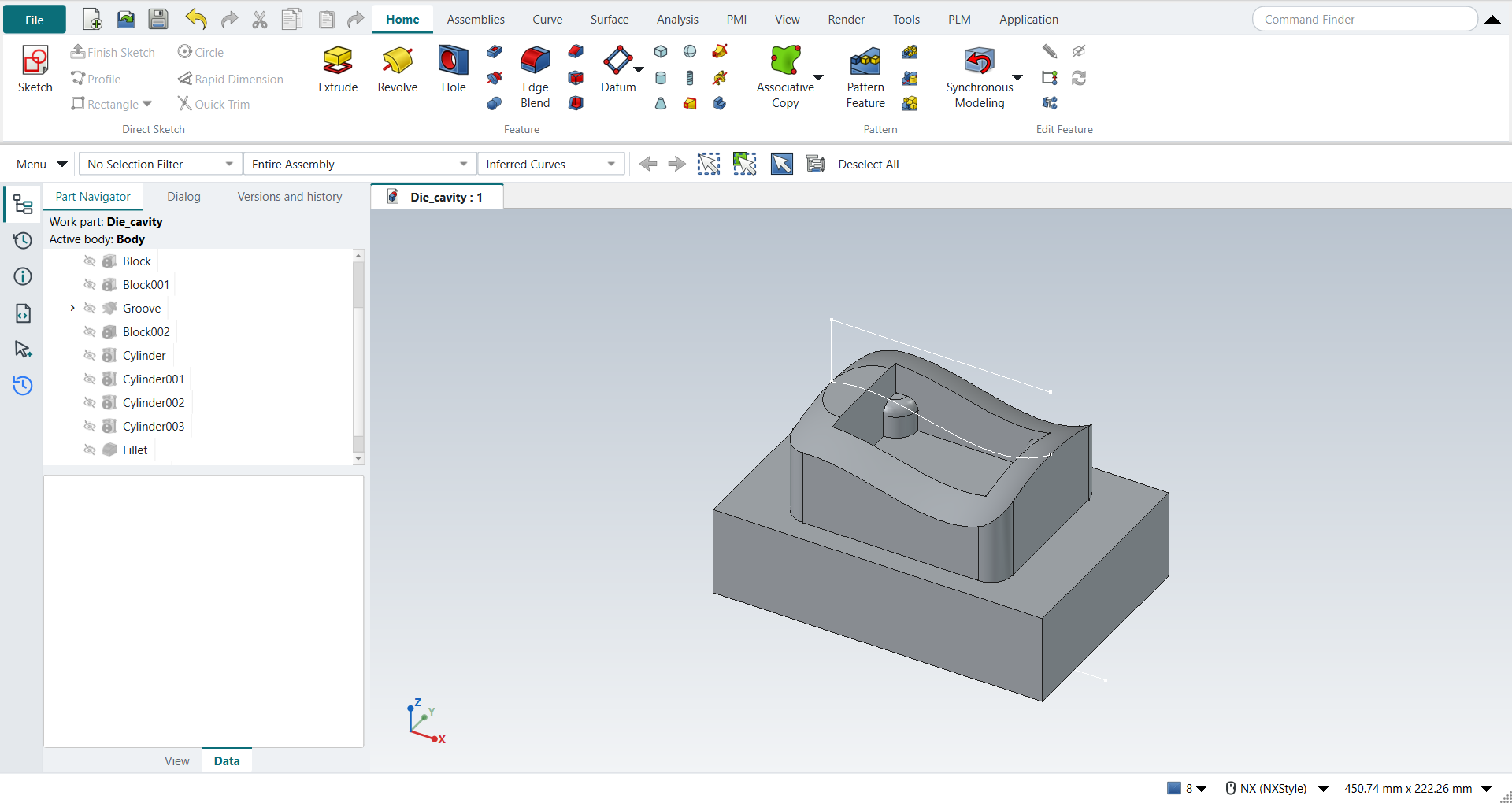
The book draws the section’s spline through four points and gives the posts as "20 inches" in a millimetre part; they are Ø20 mm here. Its pictures put R10 on the top block’s four vertical outer edges and R5 on the posts' top edges, which is what the replay blends.
Step by step
1. The blocks
Create a new part, Die_cavity, in mm.
Choose Block, type the origin (−75, −50, −80) and the lengths 150 × 100 × 40, and click OK.
Choose Block again: origin (−50, −40, −40), 100 × 80 × 40, Boolean Unite: the top block, centred.
2. The section
Click Sketch and pick the XZ plane. With Line (L) draw (50, 0) to (50, 30), then to (−50, 30), then to (−50, 0); type each point in the X and Y fields. Press S (Studio Spline, Through Points) and type (−50, 0), (−25, 1), (25, −8) and (50, 0); MB2 ends it. The section is now closed. Draw one more line from (−75, −100) to (75, −100): the revolve axis, 60 mm below the first block’s top. Finish the sketch with Ctrl+Q.
3. The curved top
Click Revolve (Subtract), set the Curve Rule to Single Curve and pick the section’s four curves. Under the axis choose Line… and pick the axis line. Type End 45 and Start −45, and click OK: the top block’s top now follows the spline.
The replay
| # | In the book (NX) | In FreeCAD NX-Style | Result | Notes |
|---|---|---|---|---|
AY1 |
Create a new file, units mm (Die_cavity) |
Ctrl+N, Model template |
same |
new document ['Unnamed4']; NX-Style parts are metric |
AY2 |
Save it as Die_cavity |
file name given once by script (the system file dialog is not driven); a change, then the Ctrl+S key |
same |
Die_cavity.FCStd rewritten by Ctrl+S: the file holds the change and the part is unmodified afterwards (modified before the key: True); FreeCAD format, not .prt |
AY3 |
Block 150 x 100 x 40 at (-75, -50, -80) |
ribbon 'Home › Feature', Type 'Origin and Edge Lengths', XC/YC/ZC -75/-50/-80 typed, length 150, width 100, height 40 typed, Boolean 'None', OK |
same |
same solid as the reference: 0 mm³ differ, box within 0 mm, 6 faces (6 in the reference); origin (-75.0, -50.0, -80.0); one undo step ['Block'] |
AY4 |
Block 100 x 80 x 40 on top, centred, Unite |
ribbon 'Home › Feature', Type 'Origin and Edge Lengths', XC/YC/ZC -50/-40/-40 typed, length 100, width 80, height 40 typed, Boolean 'Unite', OK |
same |
same solid as the reference: 0 mm³ differ, box within 0 mm, 11 faces (11 in the reference); origin (-50.0, -40.0, -40.0); one undo step ['Block']; with Body |
AY5 |
Sketch: the section (three lines and the spline through four points) and the axis line |
ribbon 'Home › Direct Sketch > Sketch' on 'XZ-plane (Base plane)'; L (Line) x3 6 points typed, S (Studio Spline) 4 typed, L (Line) 2 typed (clicked: 0); MB2 after each |
same |
1 spline, its distance from the four points [0.0, 0.0, 0.0, 0.0] mm; the section closed True; the axis line at z = -100 mm True. The book’s reference lines (the blocks' outlines) are not drawn: they only help place the curves |
AY6 |
Revolve (Subtract): the section’s curves, the axis line, Start -45, End 45 |
ribbon 'Home › Feature > Revolve (Subtract)', Curve Rule 'Single Curve', the 4 curves picked (QuickPick, click); 'Line…' + the axis line (QuickPick (the click was not taken)); Start and End typed |
same |
section of 4 curves; axis {'vector': 'line:Edge5', 'point': (0.0, 0.0, 0.0)}; limits (-45.0, 45.0) |
AY7 |
OK: the top block’s surface cut to the spline, curved across |
OK clicked |
same |
same solid as the reference: 0 mm³ differ, box within 0 mm, 12 faces (12 in the reference) |
AY8 |
Block 70 x 50 x 30 subtracted: the cavity |
ribbon 'Home › Feature', Type 'Origin and Edge Lengths', XC/YC/ZC -35/-25/-30 typed, length 70, width 50, height 30 typed, Boolean 'Subtract', OK |
same |
same solid as the reference: 0 mm³ differ, box within 0 mm, 17 faces (17 in the reference); origin (-35.0, -25.0, -30.0); one undo step ['Block']; with Body |
AY9 |
Cylinder Ø20 x 15 at the cavity’s corner (-35, -25), Unite |
ribbon 'Home › Feature', Type 'Axis, Diameter, and Height', Specify Vector 'ZC', XC/YC/ZC -35/-25/-30 typed, diameter 20, height 15 typed, Boolean 'Unite', OK |
same |
same solid as the reference: 0 mm³ differ, box within 0 mm, 19 faces (19 in the reference); origin (-35.0, -25.0, -30.0); one undo step ['Cylinder']; with Body |
AY10 |
Cylinder Ø20 x 15 at the cavity’s corner (-35, 25), Unite |
ribbon 'Home › Feature', Type 'Axis, Diameter, and Height', Specify Vector 'ZC', XC/YC/ZC -35/25/-30 typed, diameter 20, height 15 typed, Boolean 'Unite', OK |
same |
same solid as the reference: 0 mm³ differ, box within 0 mm, 21 faces (21 in the reference); origin (-35.0, 25.0, -30.0); one undo step ['Cylinder']; with Body |
AY11 |
Cylinder Ø20 x 15 at the cavity’s corner (35, -25), Unite |
ribbon 'Home › Feature', Type 'Axis, Diameter, and Height', Specify Vector 'ZC', XC/YC/ZC 35/-25/-30 typed, diameter 20, height 15 typed, Boolean 'Unite', OK |
same |
same solid as the reference: 0 mm³ differ, box within 0 mm, 23 faces (23 in the reference); origin (35.0, -25.0, -30.0); one undo step ['Cylinder']; with Body |
AY12 |
Cylinder Ø20 x 15 at the cavity’s corner (35, 25), Unite |
ribbon 'Home › Feature', Type 'Axis, Diameter, and Height', Specify Vector 'ZC', XC/YC/ZC 35/25/-30 typed, diameter 20, height 15 typed, Boolean 'Unite', OK |
same |
same solid as the reference: 0 mm³ differ, box within 0 mm, 25 faces (25 in the reference); origin (35.0, 25.0, -30.0); one undo step ['Cylinder']; with Body |
AY13 |
Edge Blend R10: the outer edges (the top block’s corners) |
4 edges selected + ribbon 'Home › Feature > Edge Blend', 'filletRadius' = 10 mm, MB2 = OK |
same |
same solid as the reference: 0 mm³ differ, box within 0 mm, 29 faces (29 in the reference) |
AY14 |
Edge Blend R5: the inner edges (the corner posts' tops) |
4 edges selected + ribbon 'Home › Feature > Edge Blend', 'filletRadius' = 5 mm, MB2 = OK |
same |
same solid as the reference: 0 mm³ differ, box within 0 mm, 33 faces (33 in the reference) |
AY15 |
The die cavity |
compared with the book’s dimensions built by the Part API |
same |
same solid as the reference: 0 mm³ differ, box within 0 mm, 33 faces (33 in the reference) |
AY16 |
Save the part |
file name given once by script (the system file dialog is not driven); a change, then the Ctrl+S key |
same |
Die_cavity.FCStd rewritten by Ctrl+S: the file holds the change and the part is unmodified afterwards (modified before the key: True); FreeCAD format, not .prt |
| Result | Means |
|---|---|
same |
The book’s NX steps work as written. |
differs |
It works, but the FreeCAD way is different; the notes say how. |
limit |
The book’s way fails in FreeCAD itself; a workaround follows in the next steps. |
missing |
FreeCAD has no such function; a stand-in follows. |
skipped |
Not replayed; the notes give the reason. |
FAILED |
Did not work. |
Each step is compared with FreeCAD’s Part API build of the book’s dimensions, the section’s spline taken from the sketch.